How can I access S3 files on Windows?
Five ways, from the AWS console in any browser to CS Browser, Cyberduck, Mountain Duck and rclone on the desktop, plus a hosted workspace for staff who should never hold AWS credentials. What each costs, and how each one signs in.
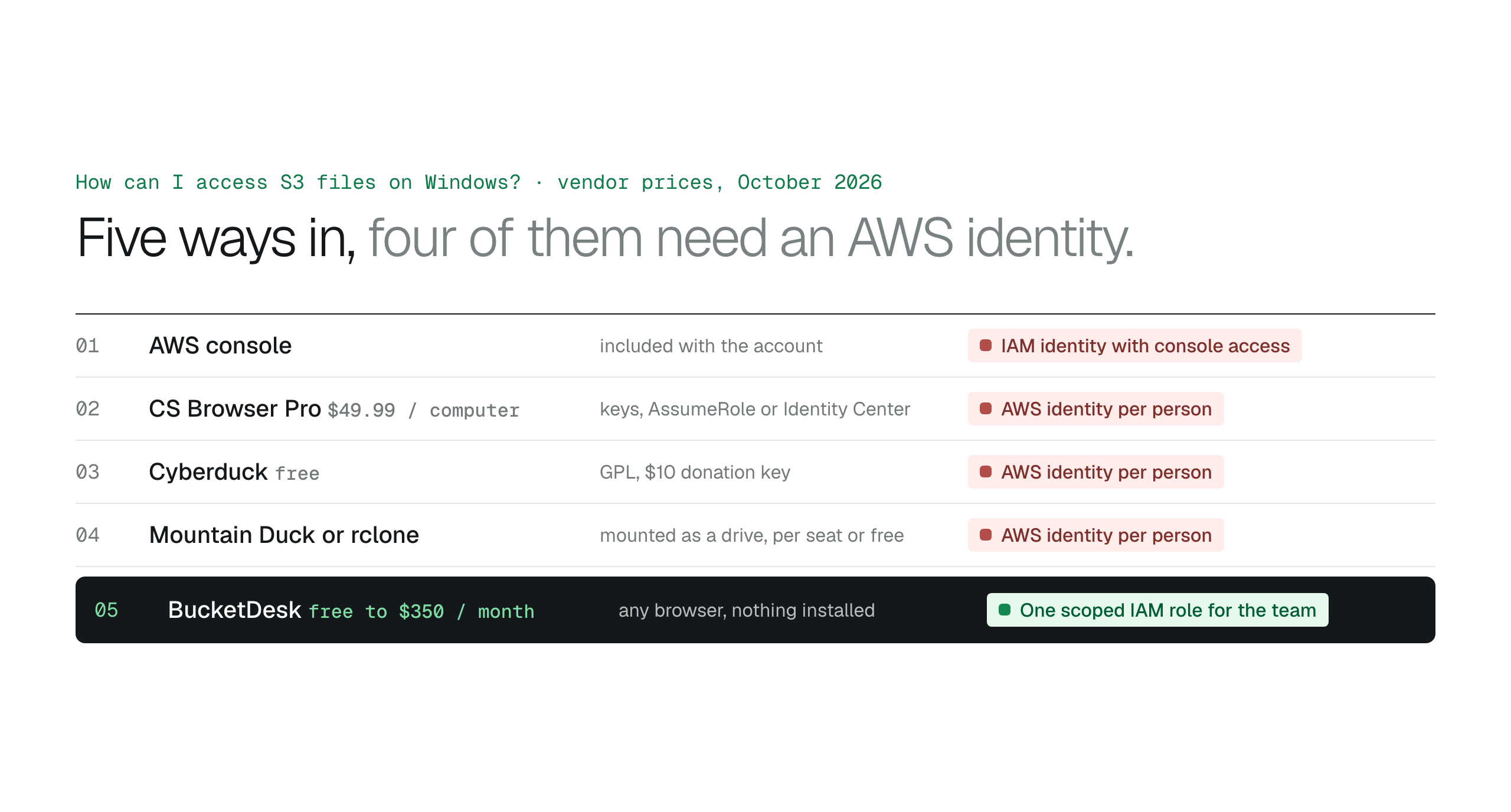
An engineer on Windows should use the console or CS Browser Pro with AssumeRole or Identity Center; a technical user who wants a drive can use Mountain Duck or rclone; everyone else is better served by a browser workspace that holds one scoped IAM role, so nobody outside engineering needs an AWS identity or a client.
On Windows you can open S3 files through the AWS console in a browser, through a desktop client such as CS Browser, Cyberduck or Mountain Duck, through an rclone mount, or through a hosted workspace that needs no client at all. The first four sign each person in as an AWS identity; the last one holds one scoped IAM role for the whole team. Prices are from each vendor's site as of October 27, 2026.
The options
| Option | Price | How it signs in to AWS |
|---|---|---|
| AWS console | Included with the account | IAM user or Identity Center user with console access |
| CS Browser (formerly S3 Browser) | Free for personal use; Pro $49.99 per computer for business use | Access keys, AssumeRole with an external ID, or IAM Identity Center |
| Cyberduck | Free under the GPL; a $10 donation removes the prompt | Access keys, credentials file, Identity Center or STS |
| Mountain Duck | Per-seat licence, 14-day trial | Same identity model as Cyberduck, mounted in File Explorer |
| rclone mount | Free, open source | Access keys or a profile, from the command line |
| BucketDesk | Minimum free; Standard $100 a month; Ultra $350 | People sign in to the workspace; one scoped IAM role per bucket |
The console: quickest for one engineer
Sign in to the AWS Management Console, open S3 and pick the bucket. You see folders and objects and can download one at a time. Every person needs an IAM identity with console access, the screens include settings they should not touch, and limiting someone to one folder means writing an IAM policy. Right for the people who run the account; wrong to hand to everyone else.
Desktop clients: CS Browser, Cyberduck, Mountain Duck
CS Browser is the long-running Windows client. The free edition is for personal use only, so business use needs Pro at $49.99 per computer, a lifetime licence with one year of upgrades. It encrypts stored keys and supports AssumeRole and IAM Identity Center, so a Windows team that manages IAM well can avoid long-term keys on laptops. Cyberduck is free and open source on Windows and macOS. Mountain Duck, from the same team, mounts the bucket as a drive in File Explorer for drag-and-drop work. All three need an AWS identity per person.
S3 file browser options compared, from the AWS console to Cyberduck, S3 Browser and Transmit
rclone: for scripts and servers
rclone mounts or syncs a bucket from the command line and runs on Windows. It is the right tool for a scheduled copy or a server that needs the bucket as a path, and the wrong one for a colleague in accounts.
A workspace: no client and no AWS identity
If the people who need the files are not engineers, the simplest route on Windows is any browser. A hosted workspace connects to the bucket once, through one scoped IAM role, and people sign in to the workspace instead of to AWS. Nothing is installed, no keys sit on laptops, and offboarding is removing a user rather than an IAM identity.
Open S3 files in Edge or Chrome, no AWS login
BucketDesk connects to your bucket through a scoped IAM role deployed with CloudFormation and assumed with an external ID for temporary credentials. Staff sign in to BucketDesk on Windows, Mac or a phone, open PDFs, images and Office files in the browser, and on Standard share links that expire and record every open. Every action lands in the Activity log.
Plans and pricingSecure AWS access with IAM roles and external IDs
Minimum is free for one bucket. Standard is $100 a month with unlimited viewers; Ultra is $350 and adds uploads, delete with confirmation and Glacier restores.
Primary sources
Discussion
0 comments · open to guests · moderatedLiked this? Get the next article by email. No schedule, no digest, one click to leave.