Amazon WorkDocs vs SharePoint: what to use now that WorkDocs is gone
Amazon WorkDocs ended on April 25, 2025, and the AWS migration tool exported each site into an Amazon S3 bucket. Here is how WorkDocs compared with SharePoint, what the export left behind, and the two paths from here: move the files into Microsoft 365, or keep them in S3 and put a workspace on top.
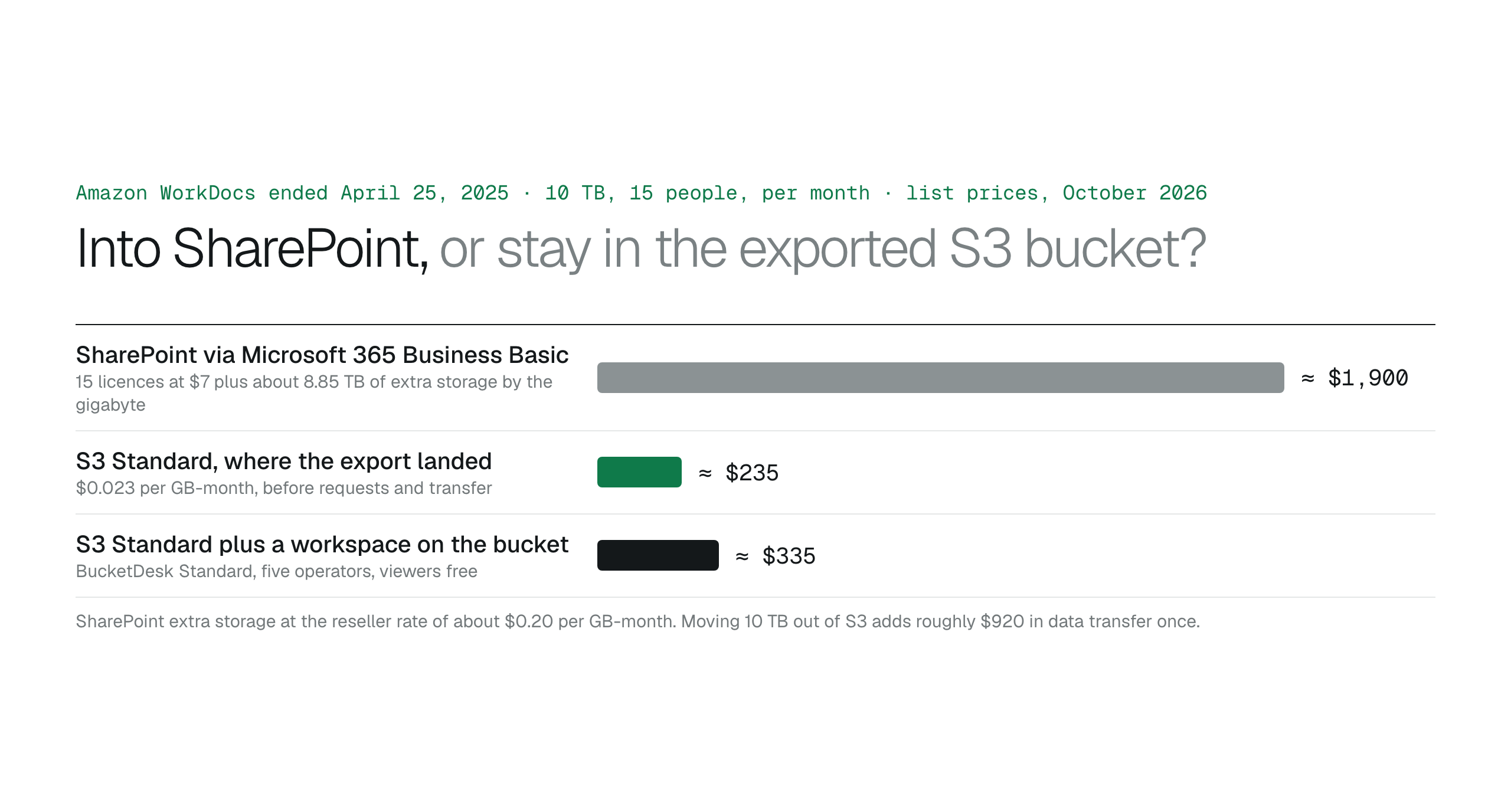
Amazon WorkDocs ended on April 25, 2025, and its export tool left most customers with an S3 bucket full of their files. Move them into SharePoint when the archive is small, the team co-authors Office files and Microsoft 365 is already paid for; at 10 TB that is roughly $1,900 a month in storage and licences. Keep them in S3 when the archive is large, other systems write to it or it must stay in your account; that is about $235 a month for storage plus a workspace such as BucketDesk for the people who need a way in.
People still search for "Amazon WorkDocs vs SharePoint", and the comparison has a twist: one side no longer exists. Amazon WorkDocs stopped taking new customers in April 2024, support ended on April 25, 2025, and AWS warned that data left on the service would be deleted the next day. The comparison that matters now is between the two places a WorkDocs library can live: inside Microsoft 365, or in the Amazon S3 bucket the WorkDocs export wrote it to.
This article covers what WorkDocs was and how it compared with SharePoint, what the AWS export left you with, and how to choose between moving into SharePoint and keeping the files in S3, with prices as listed on October 27, 2026 in US East (N. Virginia).
What happened to Amazon WorkDocs
WorkDocs was AWS's hosted document service: folders, sharing, comments and version history, billed per user and run inside AWS. In April 2024 Amazon told customers that new sign-ups and account upgrades had ended and that support would end on April 25, 2025, with all data permanently deleted after that. AWS built a data migration tool so a site administrator could export an entire WorkDocs site to Amazon S3, and individual users could download their own files. AWS named no successor service of its own; the one migration offer it published was a discount on Dropbox through AWS Marketplace.
So if your company used WorkDocs, one of three things is true today: the files were exported to an S3 bucket in your AWS account, they were moved to another product such as Dropbox or SharePoint, or they are gone. The rest of this article is for the first group, which is the largest, because the export tool was the path AWS built.
Keep business files in S3 or move them to Dropbox or SharePoint?
- Sign-ups ended: April 2024.
- Support ended: April 25, 2025.
- Data deleted if nothing was done: April 26, 2025.
- Export path from AWS: the WorkDocs data migration tool, into an S3 bucket you own.
What the export left you with
The WorkDocs migration tool wrote a site's folders and files into an Amazon S3 bucket in your own account. That is a better starting point than it sounds. The files are in storage you own, at S3 Standard's $0.023 per GB-month, with versioning, lifecycle rules to colder classes and replication available as bucket settings. What they lack is the part WorkDocs provided: a way for staff to browse, open and share them without an AWS login.
That is the real decision. The bucket is the archive; the question is whether to move the archive into SharePoint or to give people a way into the bucket.
Path two: keep the files in the S3 bucket
Keeping them is right when the archive is several terabytes or still growing, when scanners, exports or partners write into the bucket, when the files must stay in your AWS account for contractual or residency reasons, or when most people need to find, open and share files rather than edit them together.
Then the only thing missing is access. The options are the ones any S3 bucket has: the AWS console for engineers, a desktop client such as Cyberduck for one technical person, Storage Browser for S3 if you have a React app and a developer to own it, or a hosted workspace that connects to the bucket through one scoped IAM role so nobody else needs an AWS identity.
Cyberduck alternatives for teams that share one S3 bucketS3 access for non-technical teams: the complete guide
- Several terabytes, or growing.
- Other systems write into the bucket.
- Files must stay in your AWS account.
- Find, open and share, not co-author.
The bill at 10 TB and 15 people
Storage is where the two paths separate. On SharePoint the bill grows with headcount and terabytes; in S3 it grows with terabytes only, and the access layer is a separate, flat line.
- SharePoint with Business Basic: $105 a month in licences plus about $1,800 for 8.85 TB of extra storage, around $1,900 a month.
- S3 Standard: about $235 a month for 10 TB before requests and transfer, less once cold files move to cheaper classes.
- A workspace on the bucket: BucketDesk Standard at $100 a month for five operators with viewers free, about $335 a month with the storage, or Ultra at $350.
Put a workspace on the bucket WorkDocs exported to
BucketDesk connects to the bucket the WorkDocs export wrote to through a scoped IAM role you deploy with CloudFormation; no access keys are shared or stored. Staff sign in to BucketDesk, browse the exported folders, open PDFs, images, Word, Excel and PowerPoint files in the browser, and on Standard send share links that expire, can be revoked and record every open. The files never leave your AWS account.
- Connect the exported bucket
deploy the CloudFormation role in your account.
- Invite the team
people sign in to BucketDesk, with Viewer, Operator or Owner roles from Standard.
- Share outward
expiring links instead of forwarding files, with every open logged.
Plans and pricingSharing on the features page
The Minimum plan is free for one bucket, which is enough to open the exported site and see whether the team needs more than browsing.
Primary sources
Discussion
0 comments · open to guests · moderatedLiked this? Get the next article by email. No schedule, no digest, one click to leave.