Does S3 versioning cost money?
Turning versioning on is free, but every old version is a full object billed at its storage class rate until a lifecycle rule expires it. Here is what versioning adds to the bill, what delete markers cost, and the two lifecycle rules that keep it under control.
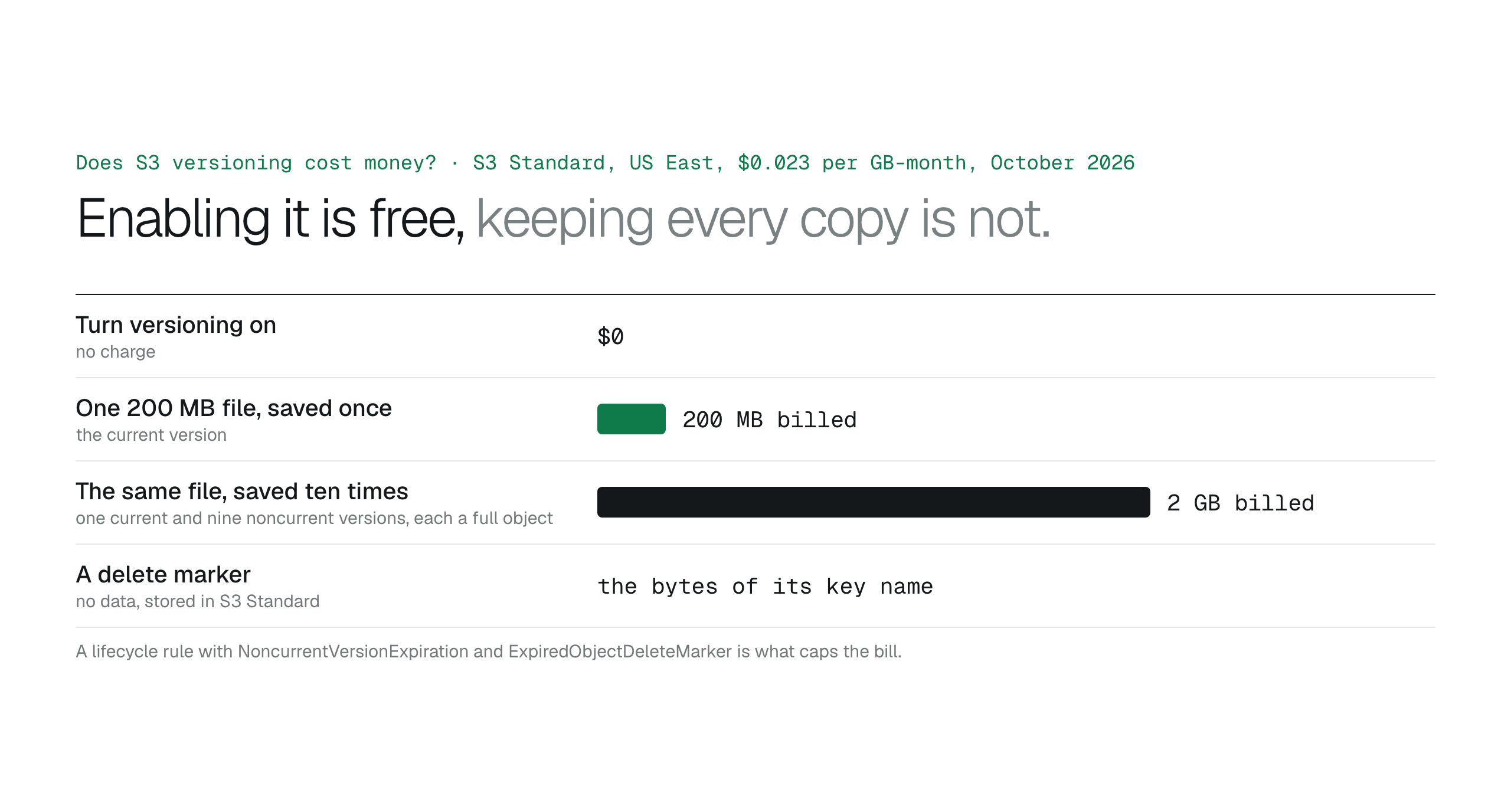
Versioning is free to turn on and never free to leave unmanaged: every noncurrent version is billed as a full object at its storage class rate, delete markers cost only the bytes of their key names, and the bucket's churn decides the bill. Pair versioning with a lifecycle rule that expires noncurrent versions after a set number of days, keeps the newest few, and removes expired delete markers.
Enabling S3 versioning costs nothing, but each old version is a full object billed at its storage class rate until something removes it. A 200 MB file saved ten times is 2 GB of storage, not 200 MB, and S3 Standard in US East (N. Virginia) bills every one of those gigabytes at $0.023 a month.
That is the whole answer for most buckets, with two details: delete markers also cost a few bytes each, and versioning cannot be switched off once it is on. The rest of this article is how the bill grows and the lifecycle rules that stop it. Prices are as listed on October 27, 2026.
What is billed
Every version has a size, a storage class and a monthly charge, and the current version is not special. Overwrite a file and the previous copy becomes a noncurrent version that keeps being billed. Delete a file without a version ID and S3 writes a delete marker on top; the versions underneath stay, still billed.
A delete marker has no data of its own. AWS says delete markers accrue a minimal charge for storage equal to the size of the key name, and that they live in S3 Standard. A million markers with 60-character keys is about 60 MB, so the markers are never the problem; the versions they hide are.
- Current version: billed at its storage class rate.
- Each noncurrent version: billed the same way, for as long as it exists.
- Delete marker: billed at the size of its key name, in S3 Standard.
- Enabling versioning: no charge.
Where the money goes
The bill grows with churn, not with size. A folder of signed PDFs that nobody edits costs the same with versioning on or off. A spreadsheet that a sync job rewrites every night has 30 versions after a month and 365 after a year, each the full file. Backup folders, exports and anything a script overwrites on a schedule are where noncurrent storage quietly outgrows current storage.
Storage Lens splits current and noncurrent bytes; if noncurrent bytes are most of the bucket, you need a rule.
The two rules that cap it
Lifecycle rules do the cleanup, and two of them matter. NoncurrentVersionExpiration deletes versions a set number of days after they became noncurrent, optionally keeping the newest few with NewerNoncurrentVersions. ExpiredObjectDeleteMarker removes a delete marker once no versions remain under it, so the bucket does not fill with placeholders. Add AbortIncompleteMultipartUpload to clear parts from uploads that never finished, which are billed too.
Choose the retention from how long it takes your team to notice a bad overwrite, not from the bill. Thirty days with the three newest versions kept is a sensible default for working folders. Worked examples are in S3 lifecycle rules for versioned buckets.
{
  "Rules": [{
    "ID": "expire-old-versions",
    "Status": "Enabled",
    "Filter": {},
    "NoncurrentVersionExpiration": { "NoncurrentDays": 30, "NewerNoncurrentVersions": 3 },
    "Expiration": { "ExpiredObjectDeleteMarker": true },
    "AbortIncompleteMultipartUpload": { "DaysAfterInitiation": 7 }
  }]
}
Why keep it on anyway
Versioning is what makes an accidental overwrite or delete recoverable without a backup, and recovering a file takes minutes when the version is still there. It can be suspended but never disabled, so plan the lifecycle rule at the same time as switching it on.
See which files are piling up versions
BucketDesk shows the files in a connected bucket with their size, storage class and last-modified date, so a folder that a job rewrites nightly is visible from the workspace rather than from a bill. Deletes made through BucketDesk on the Ultra plan ask for confirmation and are recorded in the Activity log with who did it, which is the information you need before deciding whether a version is safe to expire.
The Minimum plan is free for one bucket. S3 Savings finds the storage that is costing more than it should and applies only the changes you approve, in your own account.
Primary sources
Discussion
0 comments · open to guests · moderatedLiked this? Get the next article by email. No schedule, no digest, one click to leave.