Cyberduck alternatives for teams that share one S3 bucket
Cyberduck is a fine S3 client for one engineer. It gets awkward when ten people need the same bucket, because each of them needs AWS credentials on a laptop. Here are the alternatives, from Mountain Duck, CS Browser, Transmit and rclone to the AWS console, Storage Browser for S3 and a hosted workspace, with what each costs and how each one signs in to AWS.
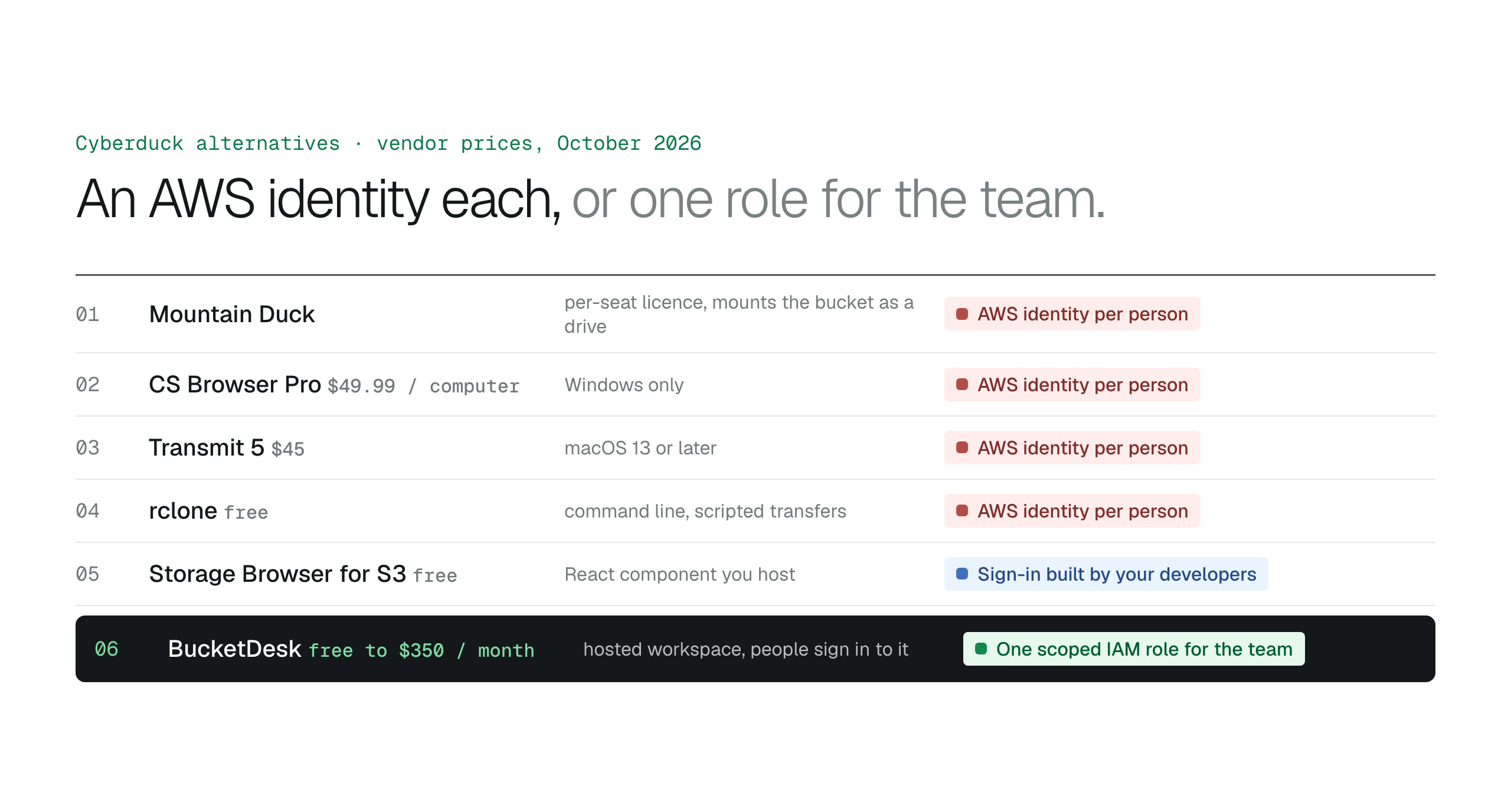
Cyberduck scales badly for the same reason every desktop S3 client does: each user is an AWS identity with credentials on a laptop. Mountain Duck, CS Browser Pro and Transmit are better desktop clients for particular technical users, rclone covers scripted transfers, and the AWS console belongs to the people who run the account. For a team that needs to find, preview and share what is in the bucket, a hosted workspace that holds one scoped IAM role is the alternative that removes the per-person AWS identity altogether.
Cyberduck is a good S3 client. It is open source, runs on macOS and Windows, speaks every protocol an engineer meets in a week, and it is free. The problem starts when the second, fifth and tenth person needs the same bucket. Each of them needs an AWS identity, each identity needs an IAM policy scoped to the right folders, and each laptop ends up holding credentials that work from anywhere until someone rotates them.
This article lists the alternatives people reach for at that point, split by who they suit: another desktop client for technical users, AWS's own interfaces, or a hosted workspace that holds one scoped role for the whole team. Prices and platforms are from each vendor's site as of October 27, 2026.
Why teams outgrow Cyberduck
Nothing is wrong with the app. For S3 it supports long-term access keys, profiles from the AWS credentials file, IAM Identity Center and temporary STS credentials with MFA, which is more than most clients offer. The cost is organisational: every person who uses it is an AWS principal, so onboarding means IAM work, offboarding means remembering to remove the identity, and "legal can see contracts but not finance" is a policy an engineer writes.
Cyberduck also opens files by downloading them to a local application. For an engineer that is fine. For a team that wants to glance at a PDF, check an invoice and send a client a link, every look becomes a download and every share becomes an attachment.
The alternatives at a glance
| Alternative | Platform | Price | How people sign in to AWS |
|---|---|---|---|
| Cyberduck | macOS, Windows | Free under the GPL; a $10 donation removes the prompt | Each person as an AWS identity |
| Mountain Duck | macOS, Windows | Paid per seat, 14-day trial | Each person as an AWS identity |
| CS Browser (was S3 Browser) | Windows | Free for personal use; Pro $49.99 per computer for business use | Each person as an AWS identity |
| Transmit 5 | macOS 13 or later | $45 one-time | Each person as an AWS identity |
| rclone | Command line, all platforms | Free, open source | Each person as an AWS identity |
| AWS console | Browser | Included with the account | IAM user or Identity Center with console access |
| Storage Browser for S3 | Your own React app | Free component; you host it | Your app's sign-in, wired by your developers |
| Transfer Family web app | Browser, AWS-hosted | $0.50 an hour per unit, about $360 a month | IAM Identity Center plus S3 Access Grants |
| BucketDesk | Browser, hosted | Minimum free; Standard $100 a month; Ultra $350 | People sign in to the workspace; one scoped IAM role |
Mountain Duck
Mountain Duck comes from the Cyberduck team and mounts a bucket as a drive in Finder or File Explorer, so the files appear in the file manager everyone already uses. It is licensed per seat: one licence covers any number of computers used by the same person, and there is a 14-day trial. It suits a technical person who wants to drag files between a bucket and local folders all day. It keeps the per-person AWS identity model, and a mounted drive makes it easy to move or delete a lot of files by accident.
CS Browser, formerly S3 Browser
The Windows client from s3browser.com is now called CS Browser. The free edition is for personal use only, so business use needs Pro at $49.99 per computer, a lifetime licence with one year of upgrades. It supports AssumeRole with an external ID and IAM Identity Center as well as access keys, and it encrypts stored keys. For a Windows-only team that already manages IAM well, it is the closest like-for-like swap.
Transmit 5
Transmit from Panic is the polished choice on a Mac: FTP, SFTP, WebDAV and S3, including Signature Version 4 and GovCloud, for $45 after a seven-day trial. It needs macOS 13 or later, so a mixed Mac and Windows office cannot standardise on it, and each person still connects with their own AWS credentials.
rclone
rclone is a free, open source command-line tool that syncs, copies and mounts cloud storage, S3 included. It is the right answer when the job is scripted: a nightly copy, a bulk move between buckets, a mount on a server. It is the wrong answer for a finance team, because it has no interface beyond the terminal.
Does AWS S3 sync delete files? Defaults and --delete explained
The AWS console
The S3 console is complete, free and already there. It shows storage class, versions and permissions, and it is where engineers change bucket settings. Every user needs an IAM user or an Identity Center assignment with console access, the screens include settings they should not touch, and the console downloads one object at a time. It is the right tool for the people who run the AWS account and the wrong one to hand to everyone else.
Storage Browser for S3 and Transfer Family web apps
Both are AWS-built browser interfaces, and both ask your team to do the identity work. Storage Browser for S3 is an open source React component you add to your own application and host yourself; AWS documents sign-in through Amplify Auth, IAM principals or Identity Center with S3 Access Grants, every bucket needs CORS rules, and the component cannot reach objects in the Glacier archive classes. A Transfer Family web app is the managed version: AWS hosts it, sign-in goes through IAM Identity Center and S3 Access Grants, and it is billed at $0.50 an hour per unit, about $360 a month, whether or not anyone signs in.
Storage Browser for Amazon S3 vs BucketDeskAWS SFTP pricing: what a Transfer Family SFTP server or web app for S3 really costs
How to choose
Pick by who will use it. Many teams end up with two tools on the same buckets: engineers keep Cyberduck or the console, and everyone else uses something that does not require an AWS identity.
- One technical person who wants a drive: Mountain Duck.
- A Windows team that already manages IAM: CS Browser Pro with AssumeRole or Identity Center.
- A Mac-only technical user: Transmit.
- Scheduled or bulk transfers: rclone or the AWS CLI.
- Your own React product that needs S3 file management: Storage Browser for S3.
- Staff and clients who need to find, preview and share files: a hosted workspace.
One role for the team instead of credentials on every laptop
BucketDesk is a web workspace on your S3 buckets. You deploy one scoped IAM role with CloudFormation; BucketDesk assumes it with an external ID for temporary credentials, so nobody outside engineering needs an AWS identity and no access keys sit on laptops. People sign in to BucketDesk, open PDFs, images, Word, Excel and PowerPoint files in the browser, and on Standard send share links that expire, can be revoked and record every open. Every action lands in the Activity log.
- Connect
deploy the CloudFormation role; remove the stack to end access.
- Invite
people sign in to BucketDesk with Viewer, Operator or Owner roles from Standard.
- Share
expiring links in place of downloads and attachments.
Plans and pricingConnections and access on the features page
Keep Cyberduck for the engineer who moves a terabyte between buckets. Minimum is free for one bucket; Standard is $100 a month with unlimited buckets and viewers; Ultra is $350 and adds uploads, delete with confirmation, Glacier restores and Document AI.
Primary sources
Discussion
0 comments · open to guests · moderatedLiked this? Get the next article by email. No schedule, no digest, one click to leave.