Choosing a Visio Document Viewer for Secure S3 Workflows
Pick a Visio document viewer for VSD and VSDX files: web converters, desktop viewers, Visio for the web, or a preview keeping the file in your S3 bucket.
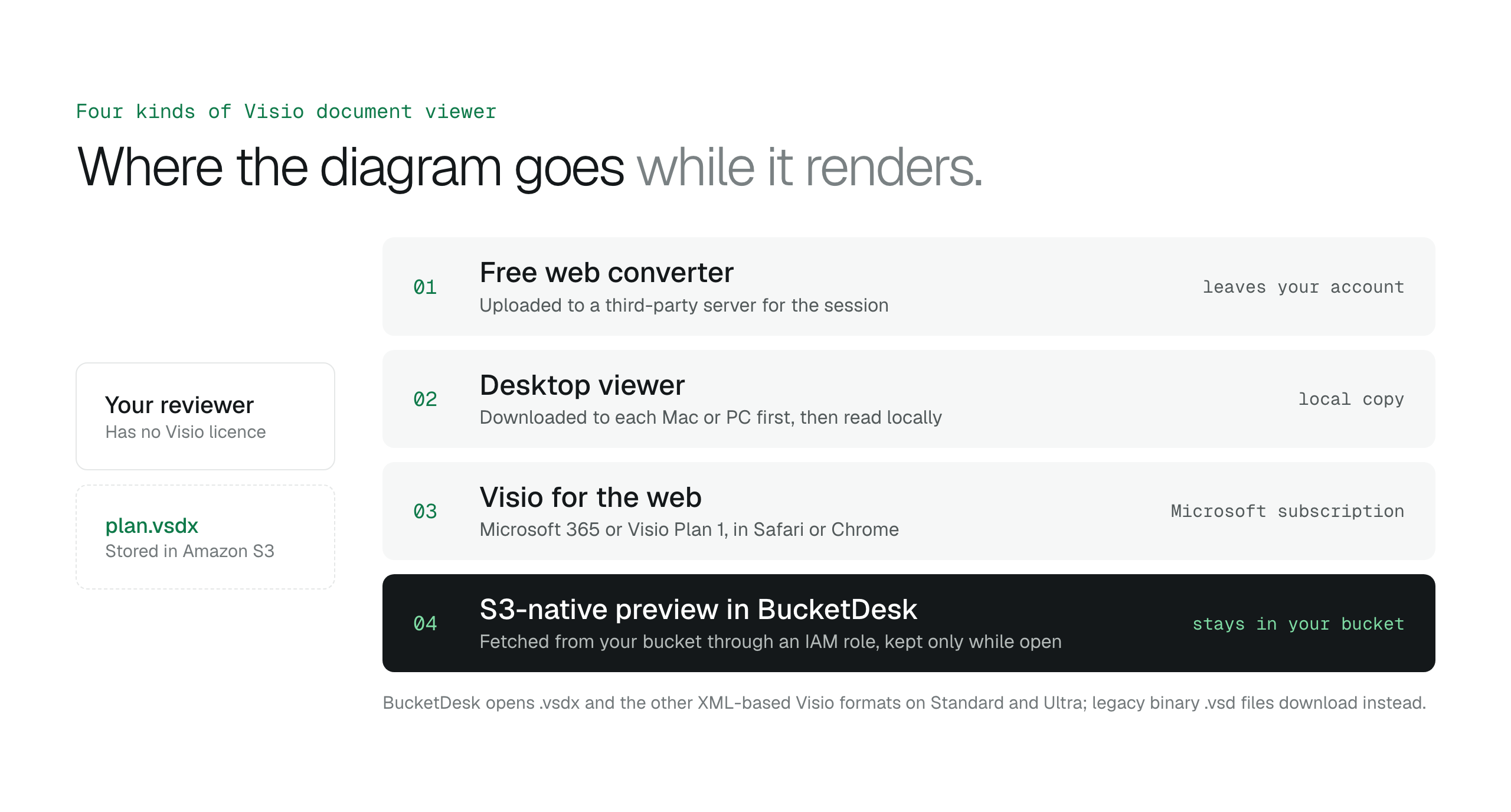
A Visio document viewer renders VSD and VSDX files without a Visio licence; the deciding question is where the file goes while it renders. Web converters copy it to a third party, desktop viewers need a local download, and an S3-native preview such as BucketDesk opens a .vsdx from your own bucket through an IAM role and shares it with expiring links.
A colleague sends you a link to a network architecture diagram stored as a .vsdx file in an Amazon S3 bucket, and your machine has no Visio licence. The file shows as a generic icon while the review meeting waits. The fix is a Visio document viewer: a tool that renders VSD and VSDX files without the authoring software. The choice comes down to where the diagram goes while it is rendered.
There are four kinds of Visio document viewer. Free web converters render the file on a third-party server. Desktop viewers install on each machine. Visio for the web needs a Microsoft 365 or Visio Plan 1 subscription. An S3-native preview, which is what BucketDesk gives you, opens a .vsdx diagram from your own bucket through an IAM role, so the file stays in your AWS account. This guide walks through each option and ends with a checklist for picking one.
How a Visio document viewer renders VSD and VSDX files
A Visio document viewer uses a rendering engine that works independently of Visio itself. It parses the XML inside a modern VSDX file, or the binary streams of a legacy VSD file, and translates shapes, connectors and text into vector graphics the browser can draw. Line weights, layers and text alignment are preserved from the original.
The engine depends on readable source data. A password-protected file cannot be opened because the viewer has no way past the encryption. A file corrupted in transfer produces broken data the parser cannot translate, and the viewer returns an error instead of a partial drawing.
Because the viewer runs without a Visio licence, team members who only consult diagrams do not need a per-user seat. Licences stay with the engineers who edit the files. For a wider look at how in-browser previews fit into S3 access, see the guide on choosing an S3 viewer.
Choosing an S3 viewer for secure business file accessHow to preview files in Amazon S3 without downloading them
- Pick the viewer by security model first, so sensitive VSD files never reach a third-party server
- Use free web converters only for diagrams you would be comfortable handing to a third party
- Preview VSDX files in your own AWS account with a secure S3 workspace like BucketDesk
- Check macOS compatibility (10.12 or later) and application size (29.9 MB) before buying a desktop viewer
- Share diagrams through expiring links so you keep control over where the file lives
Online VSD viewers: fast, but the file leaves your account
Visio was introduced in 1992 and saved its diagrams in VSD, a binary format, until Visio 2013 made the XML-based VSDX the default. Cloud archives therefore hold VSD diagrams that current software struggles to open. A web-based Visio document viewer renders these legacy files in the browser with no local install and no licence to manage.
Online tools do the rendering on their own servers, so the laptop does no work and the preview lives only in that browser session. That is convenient for a one-off look at an old drawing.
The trade-off is the upload itself. The diagram is copied to a server you do not control for the length of that session. That is acceptable for a non-confidential sketch and unacceptable for an infrastructure map. The article on what S3 Browser is explains the storage side of these workflows.
Desktop viewers for macOS and Windows
Microsoft's Visio desktop app runs on Windows only. For Mac users, Microsoft points to Visio for the web, which views, creates and edits diagrams in Safari or Chrome with a Visio Plan 1 subscription. A MacBook user who receives a VSDX file from an S3 bucket otherwise needs a third-party viewer or a workspace that previews the file in the browser.
Dedicated viewers are small and cheap. VSD Viewer for Visio Drawings by Nektony requires macOS 10.12 or later, is a 29.9 MB download and costs $14.99 on the Mac App Store. It opens binary VSD files and XML-based VDX and VSDX files. A one-time fee per machine equips a team to read diagrams without enterprise editing licences.
The limit of a desktop viewer is that it reads files on that machine. The diagram still has to be downloaded from S3 first, which creates a local copy outside the bucket's permissions. If the files live in S3, check the workspace bucket requirements before you settle on a download-first workflow.
Comparing third-party Visio document viewers
A standard browser preview fails on multi-layered VSDX shapes, so pick a tool on what it opens and where it runs, not brand recognition. As of October 2026 the market splits into passive viewers, which only display the file, and active tools, which import the diagram for editing. The table lists what each vendor states about Visio files.
A passive viewer is enough for a stakeholder who approves a final design. Engineering teams need the active tools with editing and export. When a viewer needs its own permission to reach S3 objects, scope that access with an IAM role and an external ID.
| Tool | Visio files | Platform |
|---|---|---|
| Microsoft Visio for the web | Views and edits VSDX files with Microsoft 365 or Visio Plan 1 | Browser |
| Lucidchart | Imports VSDX (Visio 2013 or later), VSD (2007 or later) and VDX (2003 or later) | Browser |
| Wondershare EdrawMax | Imports VSDX and VSD files from Visio versions before and after 2010 | Windows, macOS, online trial |
| Nulab Cacoo | Imports Visio files into an editable board | Browser |
Secure AWS access without sharing access keys: IAM roles and external IDs
Keep data residency intact with S3-native previews
Uploading a VSDX file to a free web renderer moves the organisation's infrastructure map out of its AWS environment and onto an external, unmanaged server. The diagram then falls under the third party's security policies and retention cycles instead of your compliance framework. Most web tools work this way: they ingest the file into their own infrastructure to render it.
BucketDesk works as a lens over the S3 buckets you already have rather than a new destination for file transfers. It connects through an IAM role in your account, and when someone opens a .vsdx file the diagram renders read-only in BucketDesk's own viewer, fetched from your bucket with a short-lived link and kept only while it is open. The file stays in your bucket, under your bucket's permissions and logging.
BucketDesk opens the XML-based Visio formats: .vsdx, .vsdm, .vssx, .vssm, .vstx and .vstm. Legacy binary .vsd files download instead of previewing, so re-save old drawings as .vsdx in Visio if your team still needs to read them in the browser.
The AWS Management Console is too complex for most non-technical staff, and handing them IAM keys to download files creates its own liability. Downloads also create shadow data: unmanaged copies of sensitive files on laptop drives. A workspace with temporary preview sessions lets non-technical stakeholders read S3 assets without touching raw credentials or local storage.
Viewer, Operator and Owner roles decide who can do what in the workspace, and Activity records what happened. S3 turns from a static repository into a working document system where the Visio document viewer is part of the secure environment.
Is Microsoft Visio available on the web?
Yes. Microsoft Visio is available as a web application for users with a qualifying Microsoft 365 subscription or a standalone Visio Plan 1. A project manager can view or edit a flowchart from a browser while travelling, without a local installation, including on a Mac.
How do you download the Visio desktop app?
You download the Visio desktop application by signing into your Microsoft 365 account portal and choosing the installation options under your licence. The desktop app needs a Visio Plan 2 licence, which an administrator assigns to the user. The install is tied to the organisational identity, so security updates and feature patches arrive automatically.
How much does Microsoft Visio cost?
Microsoft sells Visio Plan 1 and Visio Plan 2 as per-user subscriptions, and Visio Standard 2024 and Visio Professional 2024 as one-time purchases of the desktop edition. A department head chooses between recurring cost for web-based access and a higher upfront payment for permanent licences. The price depends on the feature set and the number of seats.
How do you convert a Visio file to Word?
Use Export to Word in the Visio desktop application, from the Process tab's Export group or from File, then Export. The feature is available to Visio Plan 2 users and produces a structured process document from the diagram's shapes and their data. The built-in export avoids the formatting errors of unverified third-party converters.
How to choose a Visio document viewer for S3
The choice of a Visio document viewer is an infrastructure decision, not a software preference. The goal is to move from raw storage to a diagram you can read now, without pulling the file out of your cloud environment. Work through five checks before you commit.
- Audit file types: the tool must open modern VSDX and legacy VSD formats
- Verify residency: the preview must not move the diagram outside your S3 region
- Test browser compatibility across the operating systems your stakeholders use
- Review access controls: expiring links for secure, temporary sharing
- Calculate total cost: per-user licences against the hours saved on manual conversions
Preview VSDX diagrams where they already live
BucketDesk opens VSDX diagrams from your own S3 bucket in the browser and shares them through expiring links, so nobody downloads a copy or uploads it to a converter.
- Connect your bucket
BucketDesk assumes an IAM role in your AWS account, with a connection-specific external ID and 15-minute credentials
- Open the diagram
a .vsdx file renders read-only in BucketDesk's own viewer, fetched from your bucket and kept only while open
- Share a preview
send a link that expires in 1 to 30 days, records every open, and can be revoked when the review is done
Choosing an S3 viewer for secure business file accessPlans and pricing
Previews of Word, Excel, PowerPoint and VSDX files are on Standard ($100 a month) and Ultra ($350 a month, after a one-month free trial). Minimum is free for one bucket.
Primary sources
- Microsoft: compare Visio options and plans ↗
- Microsoft: use Visio on a Mac ↗
- Microsoft: document Visio process diagrams in Word ↗
- Lucid: import files into Lucidchart ↗
- Edrawsoft: view, edit and create Visio diagrams without Visio ↗
- Nulab: Cacoo Visio import ↗
- Mac App Store: VSD Viewer for Visio Drawings ↗
- Wikipedia: Microsoft Visio ↗
Discussion
0 comments · open to guests · moderatedLiked this? Get the next article by email. No schedule, no digest, one click to leave.