Document Workflow Automation for AWS-First Teams
Document workflow automation for files in Amazon S3: run it in your AWS account, pick tools that use IAM roles, and give staff a workspace on the bucket.
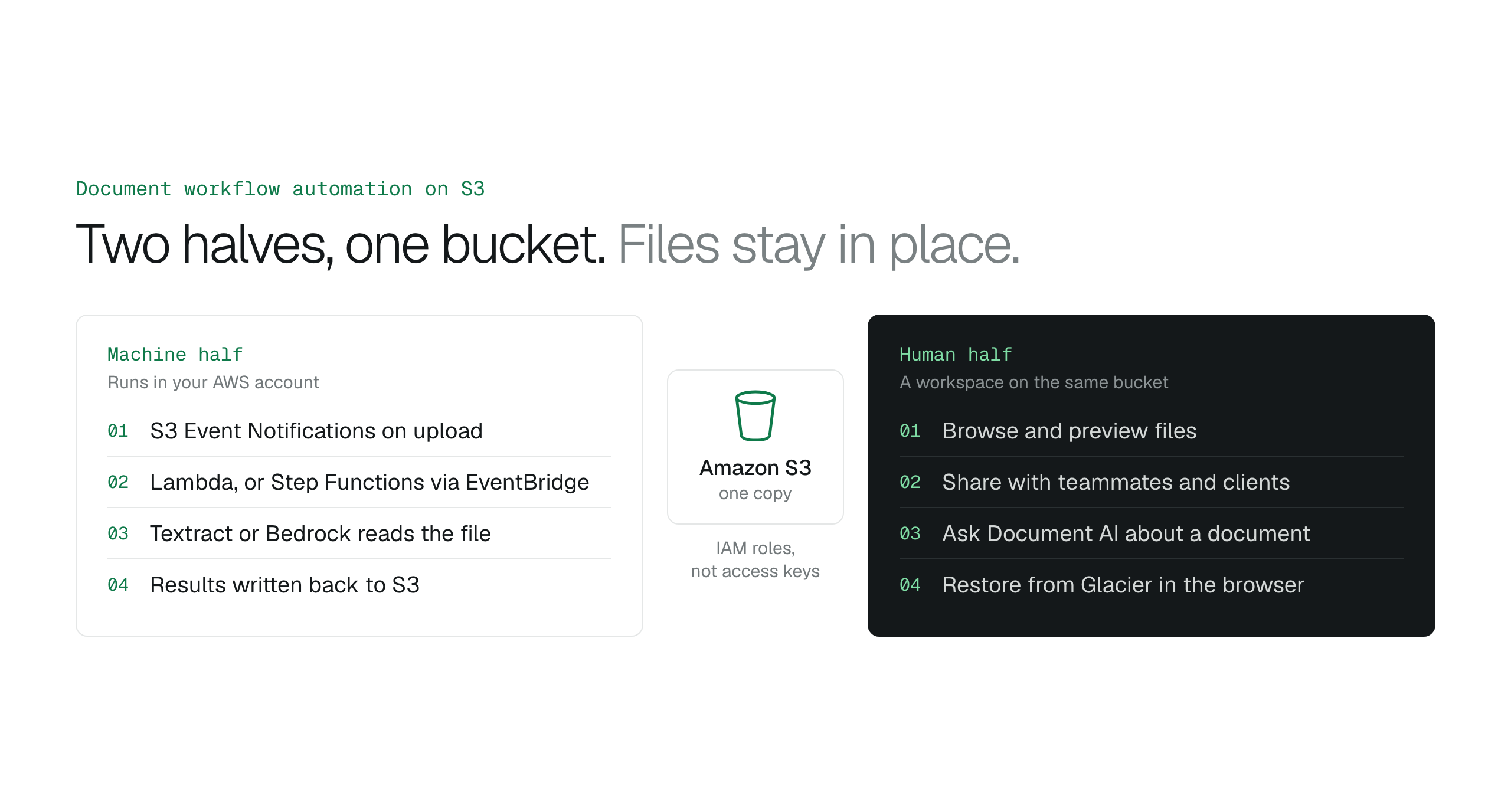
Document workflow automation for AWS-first teams runs in your own account on S3 events, connects outside tools with IAM roles instead of access keys, and gives staff a workspace on the same bucket.
Teams that keep their documents in Amazon S3 want approvals, extraction and archiving to run by themselves, but most document workflow automation tools start by copying the files into the vendor's cloud. The answer is to keep the bucket as the single source of truth: run the automation in your own AWS account, connect every outside tool with an IAM role instead of access keys, and give non-technical staff a workspace on top of the bucket so they stop filing IT tickets.
This guide compares the three architectures, ranks Zapier, Box and Egnyte for the jobs each one fits, and lists the checks to run before you choose.
Document workflow automation starts at the S3 bucket
A product lead needs to review a batch of legal contracts stored in a private S3 bucket. Without an interface built for people, they ask a DevOps engineer for temporary credentials, or a developer downloads the files and emails them. A simple review turns into a cross-team ticket, and every emailed copy is a file outside the bucket's access rules.
S3 is an excellent storage engine and a poor interface for non-technical staff. Document workflow automation for an AWS-first team therefore has two halves. The machine half runs in your account: S3 Event Notifications start AWS Lambda functions when a file arrives, or Step Functions workflows through Amazon EventBridge. The human half is a workspace on top of the same bucket, where people browse, preview and share files without the AWS Management Console.
Keeping both halves on the bucket means one copy of each file, one set of bucket policies, and one audit trail in your own account.
Data residency decides where the automation runs
A compliance officer reviews a new mortgage processing pipeline. The files sit in an S3 bucket encrypted with customer managed keys. A traditional document automation suite needs those files transferred out of AWS into the vendor's own cloud, which creates a second copy of sensitive data and a second audit trail to defend.
Storage-first platforms such as Box and Dropbox bundle their automation with their own hosting, so the files move to where the automation runs. For an AWS-first team the better design moves the automation to the files: serverless functions or containers in the same account and Region read each file in place and write results back to S3.
Data residency covers where a file travels during processing, not only where it rests. Keeping processing in a chosen AWS Region, behind IAM policies and VPC endpoints, keeps the data inside the organization's security boundary during every step. Keep business files in S3 or move them to Dropbox or SharePoint? compares the storage side in detail.
| Approach | Where files live | Access model | Best for | Avoid if |
|---|---|---|---|---|
| AWS Step Functions and Lambda | Your S3 bucket, in place | IAM roles and VPC endpoints | High-volume, high-compliance AWS workloads | The team has no AWS engineers |
| Storage-first SaaS (Box, Dropbox) | The vendor's cloud, as a copy | OAuth and vendor-managed keys by default | General office collaboration | Strict data residency rules apply |
| Self-hosted (EC2 or EKS) | EBS volumes or S3 | Security groups and IAM | Custom legacy software | The team wants less infrastructure to run |
| Managed layer on S3 | Your S3 bucket, in place | Cross-account IAM roles | SaaS ease with S3 residency | The data must live outside AWS |
Ranked tools for document triggers
A project manager receives a signed contract by email, and it has to update a database and notify a Slack channel. The trigger, the moment a document is created, changed or signed, is where document workflow automation breaks most often. Without a dependable trigger, staff fall back on manual uploads or custom scripts that fail when an API changes.
Zapier ranks first for cross-app connectivity. It is the glue for teams that run many SaaS apps, such as marketing and sales teams that want an attachment landing in a CRM to start actions elsewhere. IT teams protecting sensitive S3 buckets or strict data residency should pass on it, because every file it moves passes through Zapier's service.
Box ranks first for internal collaboration on content. It gives employees one hub to co-edit and comment on documents before a workflow starts. Engineering teams that start high-frequency compute directly from S3 events should pass on it, because Box adds a separate content store between the event and the code.
Egnyte ranks first for governance across on-premises and cloud storage. Compliance-heavy industries such as life sciences and construction use it to keep audit trails across local file servers and the cloud. Cloud-only startups with no legacy hardware should pass on it, because its governance features add overhead they do not need.
Amazon S3 Event Notifications are the native trigger for files already in S3. They fire on uploads, deletes and restores and start Lambda, SQS, SNS or EventBridge targets, but they are built for developers. S3 event notifications: run code when a file is uploaded shows how to set one up.
Document AI turns an S3 archive into answers
A procurement officer has to find force majeure clauses across five hundred vendor contracts in an S3 bucket. Done by hand, that means opening every PDF, searching for the legal terms and copying findings into a tracker for weeks.
Document AI changes the unit of work from opening files to asking questions. A language model reads the document and answers in plain language, so a reviewer gets the clause without reading every page. An automated pipeline does the same at scale: an upload event starts a Lambda function that sends the new file to Amazon Textract or Amazon Bedrock and saves the extracted fields. Amazon Textract vs Amazon Bedrock for S3 documents explains which service fits which document.
BucketDesk Document AI answers questions about one document at a time, straight from your bucket. It runs on Amazon Bedrock in your own AWS account, through a separate IAM role that the same CloudFormation stack creates, so the files stay in the bucket you chose.
Judge tools by lifecycle automation, not storage
A marketing manager needs a campaign video archived two years ago in S3 Glacier. In a typical setup that means a Jira ticket, a context switch for a cloud engineer, a manual restore request and someone watching the retrieval status. A good tool turns that multi-step technical task into a self-service action.
Security is the first test. Prefer tools that authenticate with IAM roles or OpenID Connect (OIDC) over tools that need static access keys. A tool that needs hours of manual policy work or careful secret handling fails the setup test, because the setup cost eats the time the automation saves.
The second test is whether a non-technical person can start a backend task, such as a Glacier restore, without the AWS Management Console. The tool should turn S3 API calls into plain actions any authorized employee can take. S3 access for non-technical teams: the complete guide covers how to grant those permissions safely.
The final measure is the number of IT tickets the tool removes. A platform that stores files but still needs an administrator for every access problem or restore is a storage utility, not a workflow tool.
What is a document management system?
A document management system is a central place to store, find, version and control access to electronic files. A legal team hunting for one contract version across scattered email threads is feeling the lack of one. On AWS, the files can stay in S3 while the management layer runs on top. Choosing document management software when the files are in your own cloud storage compares the options.
How does document workflow automation work?
Document workflow automation uses event triggers and predefined rules to run document tasks without a person. An upload to S3 starts a Lambda function that extracts the text and files the document in the right folder. Event-driven processing replaces manual sorting and data entry.
Is there a free document automation tool?
The AWS Free Tier covers small volumes of the building blocks, including AWS Lambda and Amazon SNS. A small team uses it to test simple document workflows before paying for higher volumes.
What does it mean to document a workflow?
Documenting a workflow means mapping how information moves from one step to the next and who approves each step. When a billing cycle stalls because a manager is away, the approval sequence was never written down. That map is the first step before any automation.
Choose native S3 integration or third-party middleware
A DevOps lead receives a surge of compliance documents across several AWS Regions. If the automation layer copies those files to another cloud to process them, the team risks breaking residency rules and pays data transfer charges for every gigabyte that leaves AWS. Document workflow automation is part of the cloud architecture, so the tool has to work with the bucket instead of around it.
- Residency: confirm which AWS Regions the documents must stay in
- Triggers: confirm the tool reacts to S3 events instead of polling
- Access: confirm it uses IAM roles instead of static access keys
- Processing: decide whether the workflow needs extraction with Textract or Bedrock, or answers to questions
- Cost: add the subscription price to the AWS data transfer charges
Give your team a workspace on the S3 bucket
BucketDesk is the human half of document workflow automation on S3: your team browses, previews and shares files in your own bucket, connected with an IAM role, and operators ask Document AI about them.
- Connect
launch the CloudFormation template to create the IAM role for your bucket
- Invite
add the teammates and clients who need the files
- Work
browse, preview, share, ask Document AI and restore from Glacier in the browser
S3 access for non-technical teams: the complete guideConnect customer AWS accounts without collecting access keysHow to restore files from S3 Glacier
Ultra adds Document AI and Glacier restore, with a one-month free trial; Minimum and Standard get a monthly allowance.
Discussion
0 comments · open to guests · moderatedLiked this? Get the next article by email. No schedule, no digest, one click to leave.