How AI Document Analysis Extracts Meaning from S3 Storage
AI document analysis reads the meaning of files, not just keywords: how it works on Amazon S3 documents, where OCR fits, and how files stay in your bucket.
AI document analysis uses a language model to read the meaning of files in S3 and answer questions about them; run the model in your own AWS account and connect it with an IAM role so the files stay in your bucket.
Files in Amazon S3 are stored safely but are hard to read at scale: a keyword search for "liability" misses the contract that says "indemnity", and nobody wants to open five years of vendor contracts one by one. AI document analysis answers that problem. A large language model reads the file, understands what the text means, and answers a plain-language question about it, with the page the answer came from.
AI document analysis is the automated process of using large language models to interpret the context and intent of unstructured files. It is different from keyword search and from optical character recognition (OCR): it finds semantic relationships between data points rather than matching text strings. This article explains how it works, why the model should run in your own AWS account, how to connect it with an IAM role instead of access keys, how to match the model to the document, and how to bring files back from Glacier for analysis.
How AI document analysis interprets context in unstructured files
A project manager might spend days searching through thousands of legacy PDF contracts in an Amazon S3 bucket to find specific liability clauses. A standard keyword search for "liability" fails on sections that use terms like "indemnity" or "legal responsibility." AI document analysis replaces pattern matching with interpretation: the software understands the intent of a query.
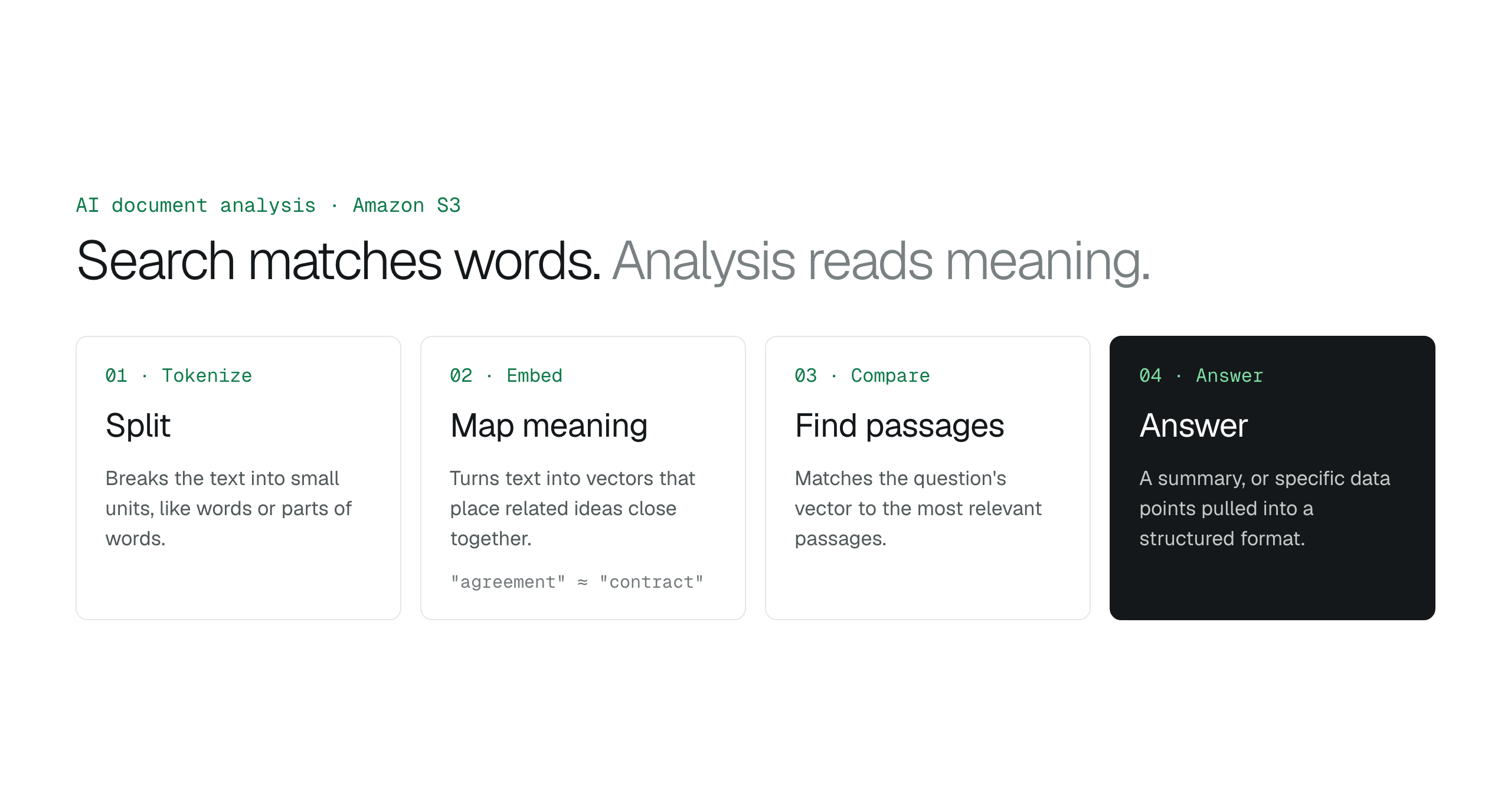
AI document analysis is the application of machine learning (ML) and large language models (LLMs) to read, summarize, and query digital files. The process begins by tokenizing the text, which breaks it into smaller units like words or parts of words. Search systems then convert the text into vector embeddings. These embeddings are numerical representations that map the semantic relationships between concepts, so the system recognizes that "agreement" and "contract" occupy similar conceptual spaces even though the characters differ.
With embeddings, the analysis tool provides structured answers from unstructured data. When a user asks a question, the system compares the vector of the query against the vectors of the document's content to find the most relevant passages. The model then synthesizes information across separate paragraphs into a coherent summary, or extracts specific data points into a structured format.
The quality of the analysis depends on the quality of the file. A document without a text layer, such as a flat image scan, contains pixels rather than characters. To check a PDF, try to select its text; if the text is not selectable, it needs an OCR step or a model that reads images. A document longer than the model's context window, the maximum amount of text it processes at once, has to be split into parts.
Bring the intelligence to the bucket to preserve data residency
A financial services firm keeps a decade of client contracts in Amazon S3. The usual way to analyze them with AI is to export them to an external platform. Every exported file creates a shadow copy of sensitive information outside the internal audit trails and perimeter defenses the organization built.
Encryption at rest and in transit protects files on the way, but it does not protect them from a breach at the third party that now stores them. Once files sit in an external AI provider's infrastructure, the data owner no longer controls their physical and logical location. The safer design keeps the files in place and sends only the question and the file being asked about to a model the owner controls.
BucketDesk changes where the processing happens. Document AI runs on Amazon Bedrock in your own AWS account, through a separate IAM role you create, and only on the file you ask about. When you ask about a file, BucketDesk reads it from your bucket through your storage role and sends it to Bedrock through the Document AI role, so your files stay in the bucket you chose, under your own bucket policies. The BucketDesk security page lists how access and permissions work.
Replace static previews with interactive document questions
A project manager needs one liability clause in a thousand-page technical manual stored in Amazon S3. The traditional workflow is to download the file, open it in a PDF viewer, and run keyword searches that miss context. The file stays an opaque block of data until a person reads it.
AI document analysis turns the file into something you can question. A knowledge worker asks, "What are the termination triggers in this vendor contract?" and gets a summary with citations to the pages it came from. The model reads the meaning of the text, not just the file name and metadata, so the answer does not depend on guessing the right keyword.
This saves the most time on large archives across Amazon S3 storage classes, where files are rarely opened and nobody remembers what they contain. Treating the bucket as a source of answers, instead of only a repository, turns stored files into usable information.
| Feature | Traditional S3 browsing | AI document analysis |
|---|---|---|
| Information retrieval | Manual search within downloaded files | Plain-language questions and summaries with citations |
| Security risk | Local copies on end-user devices | Files stay in the cloud environment |
| User accessibility | Requires knowledge of buckets and file paths | Questions in plain language, no file paths needed |
Connect via IAM roles to eliminate the credential management burden
A DevOps team configures a pipeline to scan thousands of PDF contracts in an S3 bucket. With IAM access keys, the team stores a long-term Access Key ID and Secret Access Key in environment variables or a secrets manager. Anyone who reaches the application server or the configuration repository gets a lasting way into the data. The keys also have to be rotated and audited by hand.
IAM roles replace that static secret with temporary credentials. When an analysis service assumes a role, the AWS Security Token Service (STS) issues short-lived credentials that expire automatically. A compromised session exposes no long-term key, and the exposure ends when the temporary credentials expire. No forgotten keys remain after a project ends.
Roles also scale across AWS accounts. Cross-account roles grant the analysis service read-only access to specific buckets, so an organization can connect customer AWS accounts without collecting access keys. There are no key pairs to encrypt, store or rotate, and the files stay in the account that owns them.
Match the AI model to the document type
A logistics manager reading thousands of identical shipping manifests looks for the same few fields in every file. A compliance officer reviewing a hundred-page master service agreement looks for clauses buried in nested tables and footnotes. The two jobs need different models. Matching the model to the structure of the file captures the needed detail without paying for a large model to do data entry.
Smaller, cheaper models handle high-volume, simple work, such as pulling text from clean PDFs or reading forms with fixed layouts. Larger models handle dense documents with varied layouts, and keep context across many pages. They also reason across different parts of a file to answer a complex question about legal language or technical drawings, which matters when the connections between data points are as important as the figures. For a model-by-model comparison, read Which Amazon Bedrock model for document Q&A.
Automate the transition from Glacier archives to active insights
A financial services firm holds a decade of customer correspondence in S3 Glacier Deep Archive to meet retention rules. The archive satisfies the law but gives the business nothing day to day, and its value, such as long-term customer sentiment or historical risk patterns, stays locked away. AI document analysis turns those PDFs and scanned images into a searchable asset.
The process starts with a restore request. S3 Glacier Flexible Retrieval restores take 1 to 5 minutes (Expedited), 3 to 5 hours (Standard) or 5 to 12 hours (Bulk); S3 Glacier Deep Archive restores take up to 12 hours (Standard) or up to 48 hours (Bulk). The restore creates a temporary readable copy that S3 deletes after the number of days you chose, while the original stays in its archive class. How to restore files from S3 Glacier lists the prices and steps, and When to move S3 files to Glacier explains the storage classes.
To run the analysis automatically, subscribe to the s3:ObjectRestore:Completed event with S3 Event Notifications. The event starts an AWS Lambda function or a Step Functions workflow that sends each restored file to an AI model for text extraction, entity extraction and sentiment analysis. The results go into a searchable database, and the temporary copies expire on schedule, so restored files do not sit in a more expensive tier longer than needed.
Audit every query to maintain strict compliance standards
A legal analyst needs a summary of a sensitive master service agreement stored in S3. To save time, they paste the text into a public AI chat tool. At that moment, the document leaves the corporate perimeter, and depending on that tool's terms, the provider can keep it or use it to train models. Employees do this when they want the speed of large language models and have no approved internal alternative.
Centralized AI document analysis removes that reason. The processing happens in the organization's own cloud account, where the files already live, instead of on an external provider's servers. Trade secrets and personal data stay out of public tools while staff get the same productivity.
For compliance officers, the main benefit is a central audit trail. Each question is logged with who asked it and when. When an auditor asks for proof of how documents were handled, the organization shows a timestamped record of every AI interaction with its stored files.
Is AI document analysis secure for sensitive business files?
AI document analysis is secure for sensitive files when the analysis service uses IAM roles with temporary, scoped permissions instead of static access keys, and when the model runs in your own AWS account. A healthcare provider processing patient records adds VPC endpoints so that traffic between its services and AWS stays off the public internet.
How does AI document analysis handle large PDF files in S3?
Search systems built on embeddings split large PDFs into smaller, meaningful chunks, and each chunk gets a vector embedding. When an engineer asks about a 500-page technical manual, the system retrieves only the relevant sections instead of sending the whole file to the model. This lowers latency and compute cost on large archives.
Can I use AI to query documents without moving them out of my AWS account?
Yes. Run the model in your own AWS account, for example on Amazon Bedrock, and give the analysis tool an IAM role that reads from your S3 bucket. A financial auditor then queries years of records without the files leaving the AWS account they are stored in.
What is the difference between OCR and AI document analysis?
OCR converts the shapes of letters into machine-readable text. AI document analysis interprets the intent, context and relationships within that text. OCR reads the word "Total" on an invoice; AI document analysis understands that the figure next to it is the final amount owed, including tax. That understanding lets users ask questions about files in plain language.
Does AI document analysis work on scanned images and handwritten notes?
Yes. Multimodal vision models read scanned images and handwriting by looking at the page layout as well as the characters. Given a photo of a handwritten claim form, such a model extracts the damage description. The model uses the position of text on the page to keep the information in its logical order.
How to choose between a static archive and an active knowledge base
An operations manager has to find specific liability clauses in twenty thousand legacy contracts in an S3 bucket. By hand, that is weeks of work with real room for error. With AI document analysis connected to the bucket, each question is answered in seconds. Storage becomes a source of answers instead of a place files go to be forgotten. Before choosing an AI document analysis setup, check how it fits your security and cost structure.
Define residency constraints: identify whether your industry requires all inference to happen within a specific AWS Region.
Map file complexity: determine whether your archives hold simple text or dense documents with nested tables and diagrams.
Evaluate access patterns: decide whether users need interactive questions on one file or scheduled batch processing for reports.
Review IAM policies: confirm your team can grant scoped permissions without handing out long-term credentials.
Analyze retrieval latency: calculate the time and cost to restore objects from cold storage before analysis.
Ask your S3 documents questions with BucketDesk
BucketDesk Document AI answers questions about one document at a time, straight from your S3 bucket. It runs on Amazon Bedrock in your own AWS account, through a separate IAM role you create.
- Connect
launch the CloudFormation template with AI turned on for the connection
- Open
pick a document in your bucket from the browser
- Ask
type a question about the open document and read the answer
Ask questions about documents in S3 with Claude on Amazon BedrockAmazon Bedrock Knowledge Bases on S3, or just ask the document?Amazon Textract vs Amazon Bedrock for S3 documents
Ultra includes Document AI in full; Minimum and Standard get a monthly allowance.
Discussion
0 comments · open to guests · moderatedLiked this? Get the next article by email. No schedule, no digest, one click to leave.