 BucketDesk
AWS IAM External ID: Secure Third-Party Role Access
An AWS IAM External ID stops the confused deputy problem: a vendor must send your unique ID to assume your role. How to require it and audit your roles.
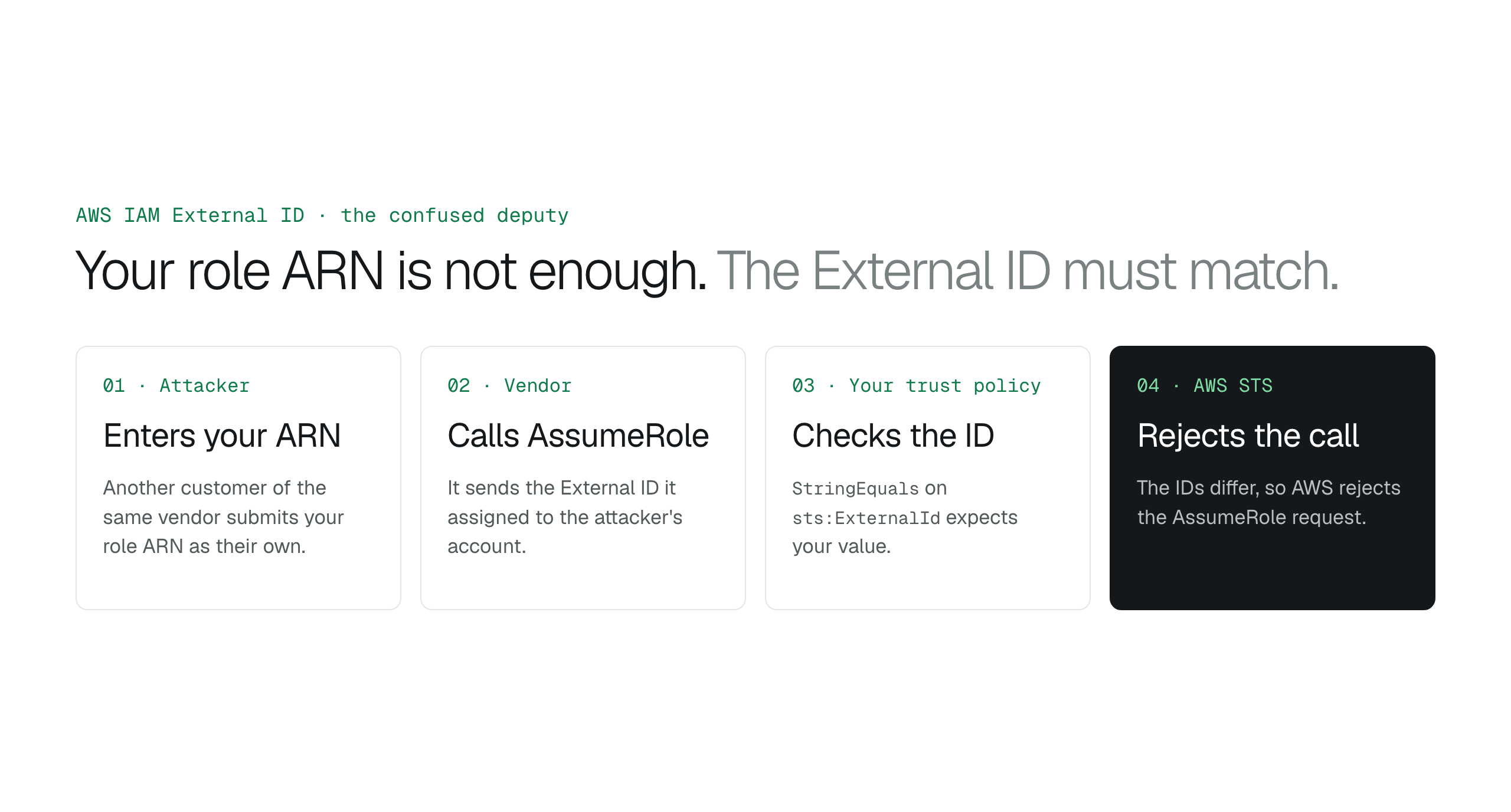
An AWS IAM External ID stops the confused deputy problem: a third party can only assume your role if it sends the unique ID it assigned to your account. Add a StringEquals condition on sts:ExternalId to every role a vendor assumes, test that requests without it fail, and use federation, not External IDs, for your own staff.
When a SaaS provider asks for access to your S3 buckets, it gives you an AWS principal to trust in an IAM role. Trusting that principal alone is not enough: another customer of the same provider can submit your role ARN as their own and get the provider to open your account for them. The fix is the AWS IAM External ID. Your role's trust policy requires a unique ID that the provider assigned to your account, and AWS rejects any AssumeRole request that does not carry it.
This guide explains the confused deputy problem, shows the trust policy condition that enforces the External ID, and gives you an audit you can run today: find every role that allows sts:AssumeRole from an outside account without a Condition block, and ask those vendors for an External ID.
The confused deputy problem creates a silent security gap
A monitoring service needs access to a customer's AWS account to collect metrics. The customer creates an IAM role and lets the service's AWS account assume it. A second customer of the same service learns the first customer's role ARN and enters it in their own dashboard. The service has legitimate permission to assume roles in many customer accounts, so it opens the first customer's account on behalf of the attacker.
This is the confused deputy problem. The service is the deputy because it holds authority across many AWS accounts. It is confused because it cannot tell whether the owner of the target account authorized the request. The customer's trust policy only checks that the request comes from the service's AWS account, so every request from the service's backend looks valid to STS, no matter which end user started it.
The External ID works like an invoice number. The provider assigns a unique ID to each customer, and the customer adds it as a required condition in the role's trust policy. The provider stores the ID and sends it with every AssumeRole call for that customer. An attacker who points the provider at another customer's ARN fails, because the provider sends the attacker's own External ID, which does not match.
Trust policies must enforce the External ID condition
The trust relationship is the JSON document that says which principals may assume a role. To enforce the External ID, the policy needs a Condition block that pairs the StringEquals operator with the sts:ExternalId key. If that key is missing, STS neither requires nor checks an External ID, and any authenticated request from the trusted account can assume the role, whichever tenant it is for.
Scope the condition to the exact value your vendor gave you. Check that sts:ExternalId is a hard requirement in the policy logic, not only a value written in a setup document. Without the condition, STS allows access based on the principal's identity alone.
{
  "Version": "2012-10-17",
  "Statement": [
    {
      "Effect": "Allow",
      "Principal": { "AWS": "arn:aws:iam::111111111111:root" },
      "Action": "sts:AssumeRole",
      "Condition": {
        "StringEquals": { "sts:ExternalId": "unique-id-from-your-vendor" }
      }
    }
  ]
}Identity federation is the alternative for internal users
The External ID secures cross-account access for third-party services. It is not how you give your own staff access. For people, connect AWS to your corporate identity provider (IdP) with identity federation.
AWS supports identity federation with SAML 2.0 for single sign-on, so users sign in to the AWS Management Console or call AWS APIs without a permanent IAM user. Federation uses SAML or OpenID Connect (OIDC), and it ties a person's access to their account in a directory such as Okta, Microsoft Entra ID or Google Workspace.
Pick by who is asking. Use an External ID when a third-party SaaS reaches into an S3 bucket or reads CloudWatch logs on a schedule. Use SAML or OIDC when an employee needs AWS access. Federation gives a person a short-lived session; the External ID verifies a standing trust between two AWS customers.
How to access Amazon S3 files without the AWS console
- Who uses it: External ID for third-party SaaS and automated services; federation for employees and developers.
- Protocol: External ID uses STS AssumeRole with a Condition; federation uses SAML 2.0 or OIDC.
- Purpose: External ID prevents the confused deputy problem; federation centralizes identity and enables SSO.
- Where it is configured: External ID in the role trust policy; federation in IAM identity providers and roles.
Check whether your integrations need an External ID
Review each IAM role whose trust policy lets an outside AWS account assume it. A role is at risk when its statement has Effect Allow for sts:AssumeRole, its Principal is a vendor's account, and it has no Condition block with the sts:ExternalId key. That role trusts the vendor's account alone, so the vendor cannot prove it is acting for you.
To fix it, ask the vendor for an External ID generated for your account. Add a StringEquals condition for sts:ExternalId to the role's trust policy, and coordinate the change with the vendor, because their AssumeRole calls must start sending the ID at the same time. If a vendor does not support External IDs, weigh the risk of keeping the integration against moving to a provider that does.
- Inventory cross-account trusts: list every IAM role that allows AssumeRole from a principal outside your organization.
- Get vendor IDs: ask each provider for the External ID generated for your account.
- Edit trust policies: add a StringEquals condition on sts:ExternalId to each role.
- Test the rejection: try to assume the role without the ID and confirm AWS denies it.
- Review the logs: check AssumeRole events in AWS CloudTrail for each third-party role.
What is the confused deputy problem in AWS?
The confused deputy problem happens when an attacker gives your role ARN to a shared SaaS tool so the tool uses its own permissions to fetch your data. The tool can access many accounts but cannot tell which customer made the request. An External ID fixes this: the tool must send the ID assigned to your account, and AWS rejects requests that carry any other value.
Is the STS External ID a secret?
No. AWS does not treat the External ID as a secret: anyone with permission to view the role can read it. Its job is to make each request unique to one customer relationship. Keep it out of public repositories anyway.
How do I add an External ID to an existing IAM role?
Open the role in the IAM console and edit its trust relationship JSON. Add a Condition block that matches the sts:ExternalId key against the string your vendor provided. AssumeRole then fails unless the vendor sends that exact ID.
Can I use the same External ID for multiple vendors?
Use a different External ID for each third-party integration. Each vendor generates its own ID for your account, which keeps each vendor's access tied to one relationship.
Why does BucketDesk require an External ID for S3 connections?
BucketDesk requires an External ID so that it proves to AWS it is acting for your workspace and no other. When another BucketDesk customer enters your role ARN, BucketDesk sends the External ID of their connection, and your role rejects the request.
Connect S3 to BucketDesk with an External ID
BucketDesk connects to your S3 buckets through an IAM role in your own AWS account, with an External ID generated for each connection. Its sessions use temporary STS credentials that expire after 15 minutes in place of a long-lived access key.
- Connect
BucketDesk generates a unique 64-character External ID for the new connection.
- Launch
the guided setup opens a CloudFormation quick-create link with the BucketDesk principal and that External ID already filled in.
- Control
the role stays in your account; delete the stack to end BucketDesk's access.
Primary sources
Discussion
0 comments · open to guests · moderatedLiked this? Get the next article by email. No schedule, no digest, one click to leave.