AI Document Review for Files in Amazon S3
AI document review on Amazon S3: check that files have a text layer, grant access with an IAM role instead of keys, and review files where they live.
AI document review works on files in Amazon S3 when the documents have a readable text layer and the review tool reaches the bucket through a scoped IAM role instead of permanent access keys, so check both before you start and review the files where they already live.
Teams with thousands of contracts, invoices or filings in an Amazon S3 bucket want AI document review to pull out the clauses and figures they need, but two things decide whether it works: whether the files have a readable text layer, and how the AI tool gets access to the bucket. Check the text layer before you start, grant access with an IAM role instead of permanent access keys, and review the files where they already live.
This guide explains how AI document review reads files, which documents break it, how to check readiness, and how role-based access keeps the bucket under your control.
AI document review automates information extraction from large datasets
A compliance officer faces a storage bucket containing thousands of vendor contracts and must identify specific indemnity clauses before a 2026 regulatory deadline. In a traditional manual workflow, this task consumes weeks of billable hours as staff open, read, and log every file individually. AI document review replaces this linear process with a scalable system that treats the entire repository as a single, searchable knowledge base. By deploying machine learning models directly against the data, organizations can extract specific data points from unstructured text without requiring a human to view the source material.
At its core, AI document review is the use of machine learning and Large Language Models (LLMs) to query, summarize, and categorize information stored in digital files. The process begins by indexing the contents of documents, which transforms raw text and images into a format that algorithms can navigate. This involves identifying patterns, entities, and relationships within the data. For organizations evaluating the financial viability of these systems, Document processing cost per page: OCR, AI and S3 explained is a critical step in calculating the return on investment for large-scale migrations.
Once the data is indexed, the system applies natural language processing (NLP) to interpret specific user prompts. Rather than relying on literal character matches, a user can ask complex questions, such as "Which contracts include a force majeure clause related to pandemic events?" The AI parses the context of the document to provide an answer, a summary, or a category label. This allows teams to turn vast amounts of unstructured data, which typically remains dark and inaccessible, into structured insights that drive business decisions.
Generative models read context, not just keywords
An analyst tasked with auditing ten terabytes of unstructured text stored in Amazon S3 faces a logistical impossibility if they rely on manual inspection. The volume of corporate data makes human-led discovery a bottleneck that delays legal proceedings and regulatory filings. Automated batch processing replaces the slow, one-by-one scrutiny that once defined high-stakes document analysis.
Traditional discovery methods often relied on basic keyword searching, which identifies specific terms but fails to understand the surrounding intent. If a search for "agreement" returns ten thousand results, a human must still determine which ones are relevant to a specific dispute. Generative models change this by applying linguistic context to every file during the ai document review process. Instead of just flagging a word, these systems interpret the relationship between sentences. This ensures that the analysis identifies the actual meaning and sentiment of the text rather than just matching character strings.
Because a model reads each file without a person opening it, review capacity grows with the compute you assign to it rather than with the size of the review team.
Poor image quality and complex formatting break the review logic
Imagine a project where thousands of legacy invoices are pulled from an Amazon S3 bucket for an automated audit. Many of these files are third-generation photocopies or scans made with outdated hardware. When an ai document review system attempts to process these files, it often returns nonsensical strings or fails to identify key fields like dates and totals. The failure is not necessarily in the large language model’s reasoning capabilities, but in the physical illegibility of the source material. If the pixels do not form clear characters, the downstream analysis is compromised from the start.
Technical limitations become apparent when dealing with low-resolution files or documents with overlapping text. While processing power has increased, the fundamental requirement for a clean text layer remains. If a scan is blurry or if physical stamps and signatures obscure the printed words, the underlying data layer becomes corrupted. An ai document review tool requires a high-fidelity digital representation to function. When the software cannot distinguish between a character and background noise, the entire analytical chain breaks down before the review logic even begins.
Highly non-linear layouts present another significant hurdle. Documents such as engineering blueprints with callouts, multi-column brochures, or complex financial statements with nested tables can confuse standard extraction algorithms. If the AI cannot determine the correct reading order, it may merge unrelated data points from different columns. This leads to a loss of context where the relationship between a header and its corresponding value is severed. Without a clear structural map, the review engine interprets the document as a "word salad" rather than a coherent piece of information.
It is a common misconception that advanced AI can "hallucinate" or reconstruct missing information into a factual record. While generative models are proficient at predicting the next likely word in a creative context, they cannot safely guess a missing digit in a corrupted financial contract. If the text layer is fundamentally broken, the system cannot reliably fill in the blanks. Attempting to force a review on illegible data results in high error rates, necessitating manual intervention. Understanding these physical and digital constraints is the first step in managing expectations for large-scale S3 data analysis.
Check that your S3 documents are ready for AI document review
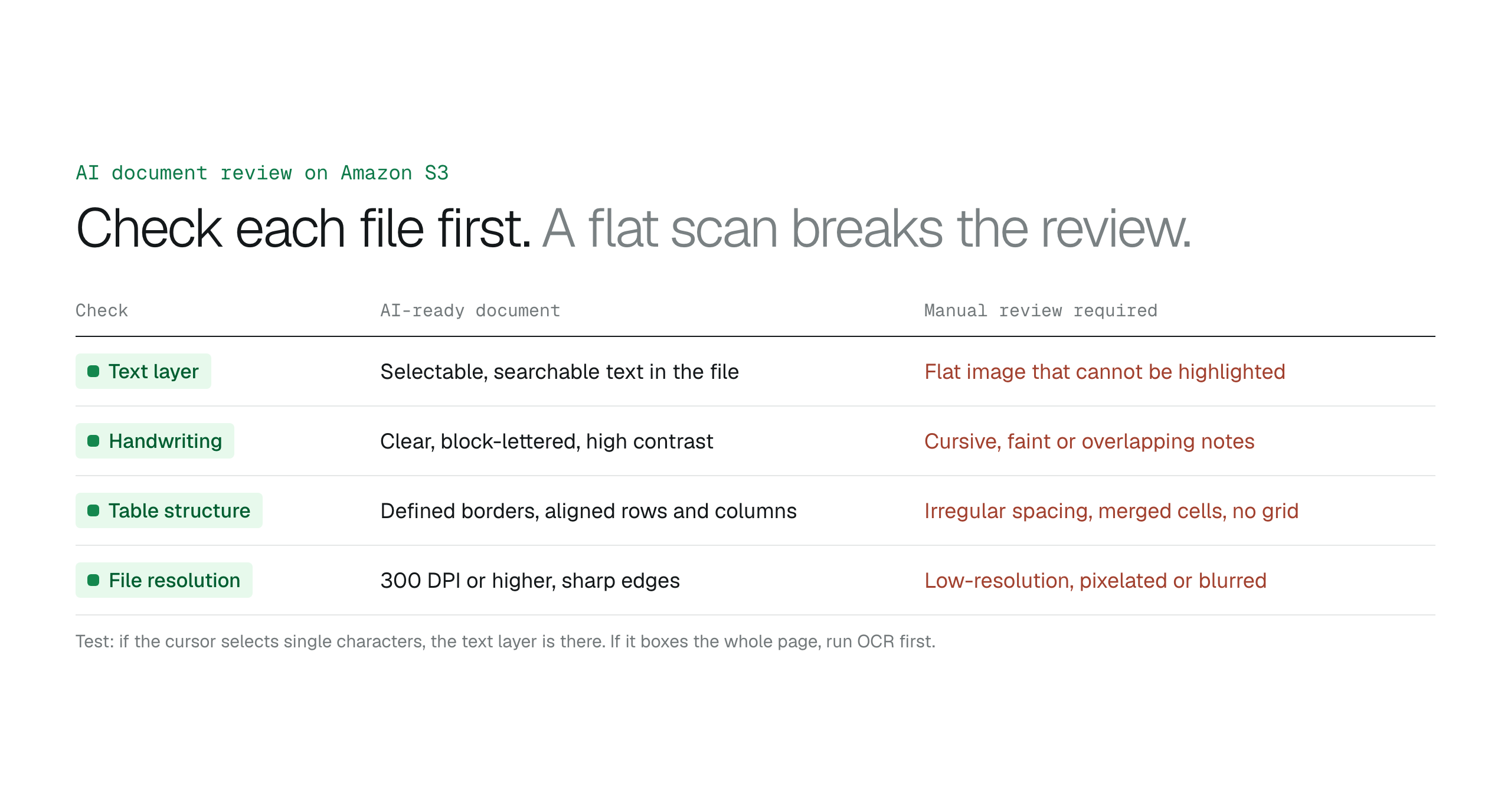
An analyst searching a 500-page legal filing might find that the "Find" function returns zero results even though the keywords are visible on the screen. This happens because the file is a flat image, which is a high-resolution photograph of a page stored within a PDF wrapper. For AI document review to scale across an S3 bucket, the system requires a machine-readable text layer. To distinguish between these formats, a user can attempt to highlight a single sentence with a cursor. If the cursor selects individual characters, the text layer is embedded and ready. If the cursor merely draws a blue selection box over the entire page, the document is a flat image that requires Optical Character Recognition (OCR) processing before the AI can interpret the data.
Physical document quality directly dictates the accuracy of the digital extraction. AI models perform best when the source material features high contrast and sharp character edges. Documents with significant noise, such as heavy fold marks, coffee stains, or bleed-through from the reverse side, can distort the spatial recognition of the text. When documents contain complex elements like multi-column layouts or nested tables, the AI needs clear, unskewed margins to maintain the logical flow of the data. Reviewing a representative sample of the dataset for these physical attributes prevents the deployment of an inference model on low-quality data that would necessitate manual correction later.
| Feature | AI-ready document | Manual review required |
|---|---|---|
| Text layer | Selectable and searchable text embedded in the file | Text is part of a flat image and cannot be highlighted |
| Handwriting | Clear, block-lettered annotations with high contrast | Cursive, faint or overlapping handwritten notes |
| Table structure | Defined borders with consistent row and column alignment | Irregular spacing, merged cells or missing grid lines |
| File resolution | 300 DPI or higher with sharp character edges | Low-resolution, pixelated or blurred scans |
Keep data residency intact by reviewing files where they live
A compliance officer at a financial services firm must analyze several million sensitive loan applications to satisfy a new regulatory audit. If those documents are stored in Amazon S3, the traditional approach involves exporting the datasets to an external AI service for processing. This movement takes the files out of the original protected environment. As a result, the security team must vet the data handling policies of a third-party vendor, which risks a violation of data residency mandates that require information to remain within specific geographic regions.
This friction occurs frequently with legacy cloud storage providers. When files live in Dropbox or Box, those platforms' AI tools work on the copies stored in the vendor's cloud. Moving S3 files there to use those tools creates "data sprawl," where sensitive copies of corporate documents exist in more than one cloud. Professionals looking to compare these architectural trade-offs can read Keep business files in S3 or move them to Dropbox or SharePoint? to see how storage location impacts long-term security.
An S3-native workflow moves the processing to the data instead. The analysis tools read the objects from the bucket through the IAM roles and encryption keys already configured for the bucket, and the model runs in your own AWS account, on a service such as Amazon Bedrock. The bucket stays the single source of truth, and the audit trail stays in your AWS account.
Scale your review capacity without increasing administrative overhead
A compliance officer needs to check liability clauses in contracts stored in an Amazon S3 bucket. In a traditional workflow, this professional submits a request to the IT department for bucket permissions or for a manual export of the files. High-value analysis stalls while waiting for technical intervention.
A workspace on the bucket removes that wait. In BucketDesk, operators open a contract in the browser and ask Document AI questions about it; the answer comes from a model on Amazon Bedrock in your own AWS account. Ultra includes Document AI, and Minimum and Standard include a monthly allowance. How to access Amazon S3 files without the AWS console shows the rest of the workspace.
How fast can AI review documents in an S3 bucket?
Speed depends on file size, file complexity and the model's throughput quota in your AWS account. Batch pipelines run many documents in parallel instead of one at a time.
Is AI document review secure for sensitive legal files?
AI document review is secure for sensitive legal files when it uses AWS role-based access and runs the model in your own AWS account. IAM roles with temporary credentials replace static keys, so access is scoped to the bucket and revocable from your own IAM console.
Can AI review scanned PDFs and handwritten notes?
AI models can review scanned PDFs and handwriting provided the text is legible and the document has a valid text layer. Flat-image scans need OCR first, and poor resolution or complex formatting breaks the review logic.
Do I need to download files from S3 to perform an AI review?
The files stay in the bucket. The review tool reads each object from S3 through its IAM role and passes it to a model in your AWS account, which keeps one copy of each file instead of the extra copies that come with moving large datasets between providers.
What is the difference between OCR and AI document review?
OCR converts images into machine-readable text, whereas AI document review interprets the meaning and context of that text to perform analysis. While OCR is a necessary precursor for scanned images, the AI layer performs the actual synthesis, classification, and information extraction. This distinction allows users to ask complex questions of their data rather than just searching for keywords.
A five-step checklist before your first AI document review
Imagine your compliance team facing a 40,000-document backlog in an S3 bucket with a regulatory deadline forty-eight hours away. Infrastructure readiness decides whether AI document review succeeds. If permissions are messy or files are unreadable, even the most advanced model fails. Before committing to any platform, run a pilot on a diverse sample of your most complex layouts to make sure the extraction holds against real-world noise.
How AI document analysis extracts meaning from S3 storageAmazon Textract vs Amazon Bedrock for S3 documentsConnect customer AWS accounts without collecting access keys
- Assess data quality: check that your PDFs contain searchable text layers rather than flat images
- Map permissions: make sure IAM roles grant scoped access without exposing root credentials
- Define extraction goals: list the fields your downstream analysis needs
- Audit residency: confirm which AWS Regions the review tool processes data in
- Calculate throughput: estimate the document volume your deadlines require
Ask questions about S3 documents in your own AWS account
BucketDesk connects to your S3 bucket with an IAM role, and Document AI answers questions about the document an operator opens, on Amazon Bedrock in your own AWS account.
- Connect
launch the CloudFormation template with Document AI switched on to create the roles for your bucket
- Open
find the contract, invoice or filing in the browser
- Ask
ask a question and read the answer about that file
Ultra, with a one-month free trial, includes Document AI; Minimum and Standard get a monthly allowance.
Discussion
0 comments · open to guests · moderatedLiked this? Get the next article by email. No schedule, no digest, one click to leave.