The short versionPlain termsFor builders
To securely share a file from a private S3 bucket, send a signed link that opens one file for a set time, and make sure the credentials behind it outlast that time: the console stops at 12 hours, EC2 role sessions at about 6, and the CLI or an SDK reach 7 days. Name the Region and endpoint for newer Regions, and give non-technical staff a tool with expiring, revocable share links instead of raw keys.
You need to securely share a file from a private S3 bucket with a client, and the link you sent stops working before they open it, or the person who needs to send it cannot use the AWS console at all. The answer is a signed link whose expiry fits the recipient, signed with credentials that outlast it, and a sharing tool for staff who should never handle AWS keys.
A secure share keeps the bucket private, opens one file, and ends on a set date. The recipient needs no AWS account, and nobody hands out long-term IAM credentials.
The sections below cover why share links die early, how to send large files, and how to give non-technical staff a safe way to share.
Why S3 share links die before the recipient opens them
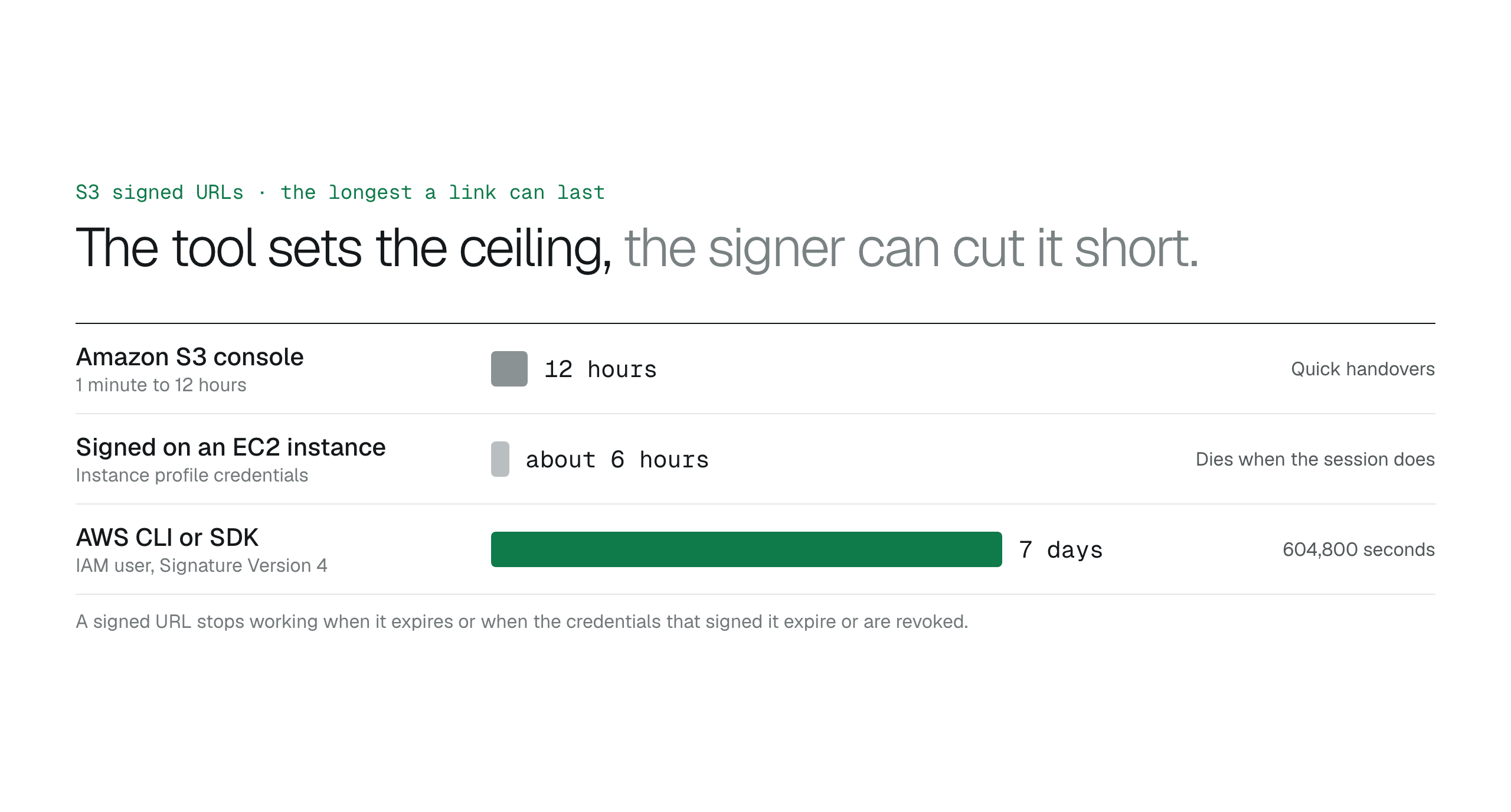
A developer sharing a dataset with a client makes a link in the Amazon S3 console and finds it must expire within the same day. The console lets you set an expiration between 1 minute and 12 hours. That suits a quick handover during a support call. It fails when the recipient cannot open the file until the next day.
The AWS CLI and AWS SDKs allow an expiration of up to 7 days, which is 604,800 seconds. Pick the console for short handovers and the CLI or an SDK for anything that must last longer than 12 hours.
The expiry you set is a ceiling, not a guarantee. A signed URL stops working when the credentials that signed it expire or are revoked. EC2 instance profile credentials have a maximum validity of about 6 hours, so a link signed on an EC2 instance with a 24-hour expiry can fail with an ExpiredToken error after a few hours. Signed with IAM user credentials under AWS Signature Version 4, a link can stay valid for up to 7 days, but that requires long-lived access keys, which are a bigger risk if they leak. Match the session length of the signing role to the expiry you want the link to have.
The Region can break a link too. For all AWS Regions launched after March 20, 2019, the signing request must name the Region and endpoint of the bucket, because Signature Version 4 includes the Region in the signature.
aws s3 presign s3://amzn-s3-demo-bucket/report.pdf --expires-in 604800 --region me-central-1 --endpoint-url https://s3.me-central-1.amazonaws.com
| Cause | What happens |
|---|
| Console expiry | The link ends after 12 hours at most |
|---|
| EC2 role credentials | The link ends when the session does, after about 6 hours |
|---|
| Region not named | The link fails in Regions launched after March 20, 2019 |
|---|
Share large files from the console
A media production house needs to deliver a 4K master file that runs to hundreds of gigabytes. Email attachments and ordinary sharing links fail at that size. Instead of creating IAM credentials for the vendor, an administrator generates a signed URL for the S3 object, and the vendor downloads that one file without an AWS account.
The Amazon S3 console can generate a presigned URL for an object up to 5 TB, with the same 12-hour limit on expiration.
How non-technical staff can securely share S3 files
A marketing manager needs to send a high-resolution video to an outside agency. Without a standard tool, they ask a DevOps engineer for a link. Under time pressure, the engineer sets a very long expiration or makes the bucket public. Either shortcut breaks least privilege and can leave the file exposed long after the agency has it.
BucketDesk connects to your AWS account through an IAM role and gives the team a plain interface for the files, so nobody handles access keys or learns CLI syntax. The buckets stay private, and every share link has an expiry date. The BucketDesk security page explains how the permissions of the role are scoped.
Staff can preview a file before sharing it, so the right version goes out. Links end on the date that was set, without anyone remembering to clean up.
Pick an expiry that fits the recipient
Choose an expiration that fits the schedule of the recipient and your security policy: long enough for a collaborator in another time zone to download the file, short enough that the link does not linger.
Expiring links keep stale access out of archived email chains and chat logs, and they keep the audit trail for outgoing data short. Store shared files in the right class before you send them; see Amazon S3 storage classes.
What if the link expired before the client opened it?
Generate a new link with credentials that stay valid for the whole window the client needs. If the first link was made in the console and the client needs more than 12 hours, make the new one with the CLI or an SDK.
Are signed S3 links safe to share?
Signed S3 links are safe when they have short expiration times and travel over encrypted channels. Anyone who holds the link can use it until it expires, so send it only to the person who needs it. If a link to a sensitive spreadsheet is intercepted, the exposure lasts only until the signature expires.
Checklist before you send an S3 share link
A stakeholder needs a report on a Friday afternoon, and the link you made two hours ago has already expired because the IAM session behind it ended. Run through these five checks before you send the next one.
- Duration: set the exact window the recipient needs to download the file.
- Credentials: confirm the IAM user or role will stay valid until the link expires.
- Region: name the Region and endpoint if the bucket is in a Region launched after March 20, 2019.
- Size: confirm the object is within the 5 TB console limit if you generate the link there.
- Team: decide whether non-technical staff can do these steps safely without help.
The solution
Share S3 files without handing out keys or links that die early
BucketDesk lets your team share files straight from your private S3 bucket through an IAM role, so nobody generates presigned URLs by hand or holds access keys.
- 1
Sharepick the file, enter the email of the recipient and set an expiry of 1 to 30 days.
- 2
Verifythe recipient enters a 6-digit code sent to that email before the file opens.
- 3
Revokewithdraw the link at any time, and every open is recorded in the activity log.
Try it out now
What to check before you send a share link
Sharing is available on Standard and Ultra. Try Ultra free for one month.
Discussion
0 comments · open to guests · moderatedLiked this? Get the next article by email. No schedule, no digest, one click to leave.