AWS S3 cost skills on GitHub: what each one actually checks, and one you can run today
The official AWS skill bundle and the popular community cost skills, read one by one: which of them look at your buckets and your bill, which only repeat the pricing page, and a read-only S3 cost review skill you can install in one command.
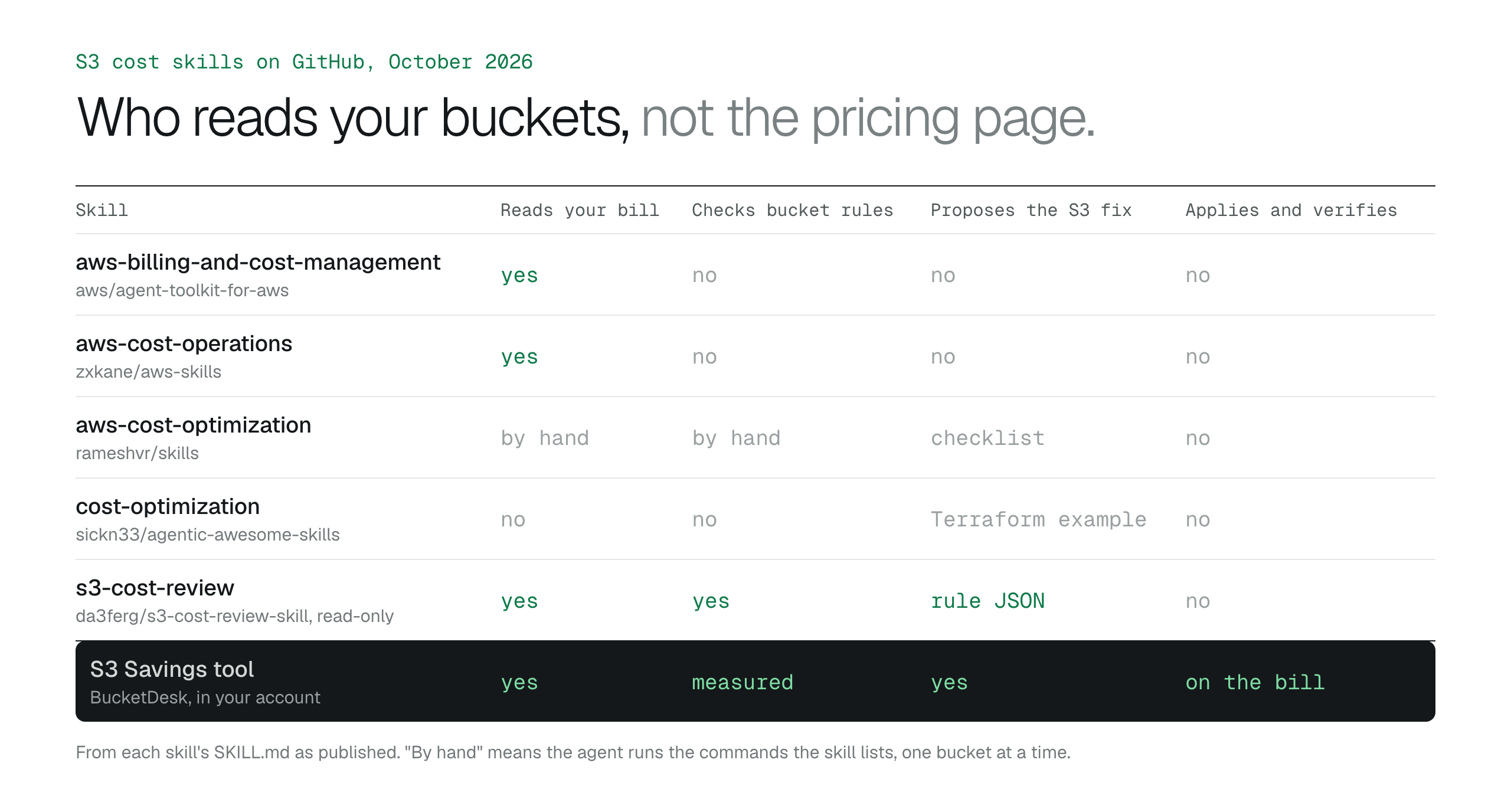
Most AWS cost skills on GitHub are guidance: they teach the agent what AWS recommends, and the official aws-billing-and-cost-management skill does not cover S3 lifecycle, Intelligent-Tiering or Storage Lens at all. The account-aware ones read the bill by service and stop there. For S3, what matters is whether a skill opens each bucket and checks for the three rules that decide most of the storage line, so install s3-cost-review with a read-only profile to see which rules are missing, and use the BucketDesk S3 Savings tool when you want the versions and reads measured and the fixes applied and verified.
Search for aws skills github or s3 cost skill and you get two things: the official AWS skill bundle, and a long tail of community repositories with a cost optimization folder in them. A skill is small. It is a folder with a SKILL.md file that tells a coding agent such as Claude Code, Cursor, Codex or Kiro when to use it and what to do. Installing one takes a command. Knowing whether it will do anything about your S3 bill takes reading it.
This guide reads them for you. For each skill it says whether the agent ends up looking at your buckets and your bill, or only at a page of AWS best practice, and what the fix would still need from you. At the end there is a read-only skill you can install today that does look, with a plain list of what it cannot see.
What a skill is, and the one question to ask of it
A SKILL.md file starts with a name and a description. The description is what the agent matches your request against, so a skill that says it is for reducing AWS bills gets loaded when you ask about the bill. The rest of the file is instructions, and a skill can ship scripts and reference documents next to it. Install tools such as the skills CLI copy that folder into the agent's skills directory; you can also copy it there yourself.
That gives two kinds of skill. A guidance skill is text: storage classes in price order, the lifecycle rules AWS recommends, the discounts Savings Plans offer. A runnable skill carries a script or exact commands, and the agent runs them against your account with your credentials.
For cost, the difference is everything. The pricing page is public and the agent already knows it. The money is in your account, and only something that reads Cost Explorer and each bucket's settings can say which bucket the money is in and which setting is causing it. So the question to ask of any cost skill is: does it read my bill and my bucket configuration, or does it tell the agent what to tell me?
How to reduce Amazon S3 costs: the three settings that cut most billsAWS FinOps Agent finds the cost. Fixing it is the hard part
The official AWS skills: wide, and not about S3 cost
AWS publishes its skills in the aws/agent-toolkit-for-aws repository: 24 core skills and specialized sets for storage, security, serverless, analytics and more, with install paths for Claude Code, Codex, Cursor, Devin, Kiro and the skills CLI. It is the right starting point for anyone building on AWS with an agent. For S3 cost specifically, here is what it holds.
The aws-billing-and-cost-management skill is the cost one. It gives the agent Cost Explorer commands (aws ce get-cost-and-usage), budgets, Savings Plans and Reserved Instance evaluation, and rightsizing through Compute Optimizer for EC2, Lambda, RDS and EBS. Its reference files follow the same list. S3 lifecycle rules, Intelligent-Tiering and Storage Lens are not in it, and Compute Optimizer does not cover S3.
The aws-storage skill chooses between object, file and block storage and sends deep cost questions to the billing skill. It says lifecycle rules move data to lower-cost classes, without rule examples. The storage set has securing-s3-buckets and troubleshooting-s3-files, which are about access and permissions, not cost.
So with the official bundle installed, an agent can read your S3 bill by usage type and quote prices correctly. It will not open a bucket's lifecycle configuration and tell you what is missing unless you walk it through that yourself.
# All skills, any agent the skills CLI supports
npx skills add aws/agent-toolkit-for-aws/skills

# Claude Code, as a plugin
/plugin install aws-core@claude-plugins-official

# Codex
codex plugin marketplace add aws/agent-toolkit-for-awsCommunity cost skills: three worth reading
Three community skills come up on most searches. They are honest about what they are, and each is useful for something.
The aws-cost-operations skill in zxkane/aws-skills is the most account-aware. It wires the AWS Pricing, Cost Explorer and CloudWatch MCP servers into the agent, so it can estimate what a design will cost before you build it and break down the last 30 days of spend by service. It works at the service level. It does not read a bucket's versioning or lifecycle settings, so it can tell you S3 is the third biggest line, not why.
The aws-cost-optimization skill in rameshvr/skills is guidance with commands. Its S3 section lists the storage classes from most to least expensive per gigabyte, lifecycle policies, Intelligent-Tiering, and cleanup of incomplete multipart uploads and old object versions. That is the right checklist. The agent still runs each command by hand, bucket by bucket, and you still read the output.
The cost-optimization skill in sickn33/agentic-awesome-skills covers AWS, Azure and GCP in one file. Its S3 example is a Terraform lifecycle rule that moves objects to Standard-IA at 30 days, Glacier at 90 and expires them at 365. Its own evidence section says the figures are illustrations and that expiry needs exact targets and a tested recovery. Read that section before copying the rule, because an expiry rule on a bucket of contracts deletes contracts.
# One named skill from a repository, into Claude Code
npx skills add https://github.com/zxkane/aws-skills --skill aws-cost-operations -a claude-code- Install from the GitHub repository you have read, not from a directory listing. Several sites index skills, and a listing can point at a different repository from the one it describes.
- A skill with a Terraform or CLI example that expires objects is a deletion rule. Treat it like one.
- Star counts tell you a repository is popular, not that its cost figures are current. The prices in a skill file have a date, or they have no date and you should assume they are old.
What an S3 cost skill has to check
For a bucket of business files, storage is the big line, and three settings decide most of it. Every overwritten or deleted file in a versioned bucket is still stored as an old version until a rule expires it. Uploads that failed halfway keep their parts until a rule aborts them. Files nobody has opened in months pay the Standard rate until something moves them. None of the skills above opens the bucket and checks for those three rules.
A useful skill also reads the bill the right way. Cost Explorer grouped by usage type separates TimedStorage lines, which are storage and which those three settings change, from Requests, DataTransfer and Retrieval lines, which are usage and which they do not. If most of the S3 line is data transfer, lifecycle rules will not move it, and a skill should say so before proposing them.
- Versioning on with no NoncurrentVersionExpiration: old versions are kept forever.
- No AbortIncompleteMultipartUpload rule: unfinished uploads are never cleaned up.
- A large Standard footprint with no lifecycle transition: everything pays the Standard rate.
- The S3 bill by usage type, so you know whether storage is where the money is.
One you can install today: s3-cost-review
We published s3-cost-review, a read-only skill that checks those four things across every bucket the credentials can see. It runs a single Python script through the AWS CLI, with no packages to install. Every call it makes is a Get or a List. The report is Markdown: a table of buckets with Region, versioning state, Standard and total gigabytes and object count; one finding per missing rule with the exact lifecycle rule JSON it proposes; three months of the S3 bill by usage type; and a section headed Not checked.
The proposals are deliberately cautious. The version rule keeps the newest old version of every file. The upload rule aborts after seven days, which is safe on any bucket because a finished upload is an ordinary object. The tiering rule skips objects under 128 KB, and the saving printed next to it is a ceiling that assumes every byte is cold, not a forecast. The SKILL.md tells the agent to ask what retention the business needs before it suggests a number of days, and never to apply a rule itself.
# Install into the agent you use (Claude Code, Codex, Cursor, Kiro)
npx skills add da3ferg/s3-cost-review-skill

# Or run the script yourself with a read-only profile
python3 skills/s3-cost-review/scripts/review.py --profile my-profile > s3-cost-review.md
GitHub: da3ferg/s3-cost-review-skill ↗AWS: Lifecycle configuration elements, including NoncurrentVersionExpiration ↗
- It does not apply anything. You put the rule on the bucket, or ask the agent to, after reading the existing rules.
- It does not size old versions. CloudWatch reports bucket bytes without splitting current from noncurrent; that needs an S3 Inventory report.
- It does not measure how often files are read, so the tiering figure is the most you could save, not what you will.
- It does not look at requests, data transfer, replication or Glacier retrievals beyond showing their lines on the bill.
Before you give any cost skill your credentials
A skill is a set of instructions the agent follows with whatever access the profile has. Read the SKILL.md and any script it ships before installing it, the same way you would read a shell script a colleague sent. Then give the review a read-only profile; the policy s3-cost-review needs is nine actions, all Get, List or Describe, and it is in the repository.
Be careful with the moment a skill moves from reviewing to changing. The put-bucket-lifecycle-configuration call replaces every rule on the bucket, so a skill that adds a rule must read the existing rules first and send the full list back, or a transition rule somebody set last year silently disappears. And deleting old versions is not reversible, so that step deserves an approval per bucket, with the retention written down.
- Read the skill and its scripts before installing.
- Review with read-only credentials.
- Any rule change goes on top of the existing rules, never instead of them.
- Version deletion gets a per-bucket approval and a written retention period.
Measure it, fix it, and see it on the bill
The skill above tells you which settings are missing. The BucketDesk S3 Savings tool goes the rest of the way inside your own AWS account: it measures how much of each bucket is old versions and how often files are actually read, applies the three fixes under retention rules you set, and shows the saving on the following AWS bill. No file contents or file names ever leave your account.
- Connect in one step
Deploy one CloudFormation stack from the Tools page in BucketDesk. It reads your bucket settings, storage metrics and three months of your S3 bill. Nothing is changed.
- See measured numbers
A free, read-only assessment shows what you pay now, what each change would save, and which figures are measured rather than assumed.
- Apply with one click
BucketDesk expires old versions and unfinished uploads under your retention rules, puts cold data on Intelligent-Tiering with instant access, and verifies the saving on the bill. Deleting versions always asks first.
Compare plansAsk us about your bucket
No upfront price. Nothing is charged until the savings verified on your AWS bill pass $500 in total; after that BucketDesk bills a share of what you save, starting at 10%, for twelve months, on your BucketDesk invoice.
Primary sources
- GitHub: aws/agent-toolkit-for-aws ↗
- GitHub: zxkane/aws-skills ↗
- GitHub: rameshvr/skills, aws-cost-optimization ↗
- GitHub: sickn33/agentic-awesome-skills, cost-optimization ↗
- GitHub: vercel-labs/skills, the skills CLI ↗
- GitHub: da3ferg/s3-cost-review-skill ↗
- AWS: Lifecycle configuration elements ↗
- AWS: Configuring a bucket lifecycle to abort incomplete multipart uploads ↗
- AWS: How S3 Intelligent-Tiering works ↗
- AWS: Using AWS Cost Explorer ↗
Discussion
0 comments · open to guests · moderatedLiked this? Get the next article by email. No schedule, no digest, one click to leave.