Best AI Document Management Software for 2026
The best AI document management software for 2026 compared: BucketDesk, Box, Egnyte and Google Workspace on storage, AI features and security.
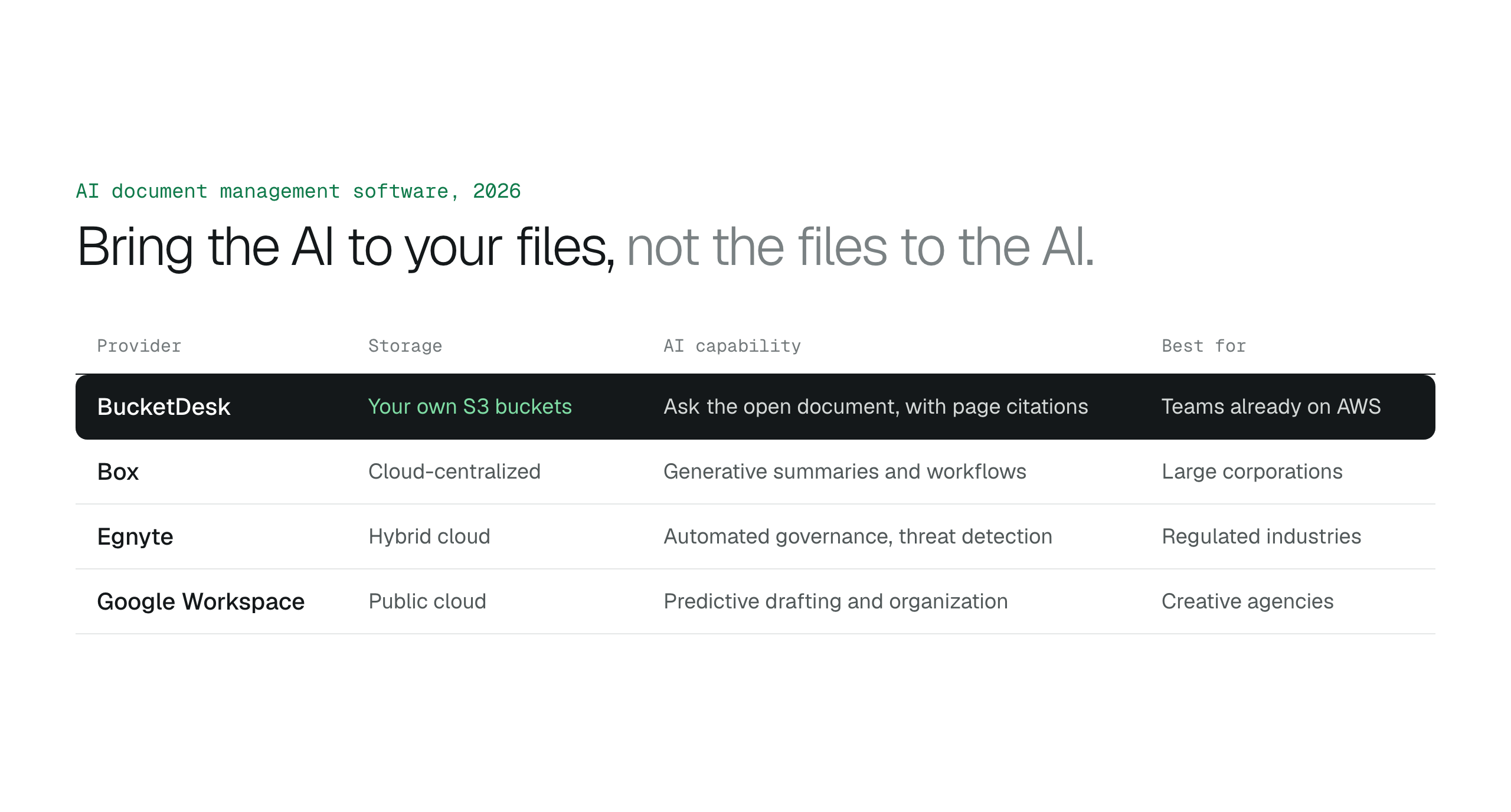
The best AI document management software for 2026 is the one that brings AI to where your files already live. If your documents are in Amazon S3, choose a tool that connects through a temporary AWS role, shares through expiring links and answers questions about the document you open, instead of copying your library into a vendor's cloud.
AI document management software reads the content of your files, not just their names, so people can ask a question and get the answer instead of opening fifty PDFs. The best AI document management software for 2026 depends on where your files live: if they are already in Amazon S3, pick a tool that brings the AI to your bucket instead of moving the files into a vendor's cloud.
This guide compares BucketDesk, Box, Egnyte and Google Workspace on where files are stored, how the AI reaches them, what the AI can answer and what each costs.
Key takeaways for choosing AI document management software
Each of these checks narrows the shortlist before you compare features.
- Storage: choose a solution that connects directly to your own AWS S3 storage to keep data residency and security.
- Access: prioritize tools that use keyless AWS role connections over those requiring shared IAM access keys.
- Document AI: use it to get answers out of unstructured files such as PDFs, contracts and Office documents.
- Sharing: select platforms that offer expiring link sharing to meet modern compliance and security standards.
Best for files already in Amazon S3: BucketDesk
A marketing department at a mid-sized firm needs answers from five years of archived contracts stored in an Amazon S3 bucket. The technical team will not give marketing staff access to the AWS Management Console, so the contracts sit unread. For organizations already on Amazon Web Services, the hard part of AI document management is access and safety, since storage capacity is already solved.
BucketDesk is a file workspace on top of the S3 buckets a company already owns. Teams browse, search, preview and share files in the browser, and on the Ultra plan they open a document and ask Document AI a question. The answer cites the page it came from.
BucketDesk connects through an AWS role that trusts one BucketDesk role and requires a random external ID per connection, and it works with temporary AWS credentials that expire after 15 minutes. Document AI calls Amazon Bedrock in the organization's own AWS account through a separate role, so the model usage appears on that account's AWS bill. The AWS access page lists the permissions each plan asks for, and the security page covers how the workspace is run.
The Minimum plan is free for one bucket, and Ultra, which includes Document AI, is free for the first month.
Try Document AI on your own bucket, free for a month ↗What you need to connect a bucket
The 2026 shortlist of AI document management software
A project manager searching for one indemnity clause across five versions of a contract in ten folders can lose an afternoon to it. AI document management shortens that search by reading what is inside each file. The four tools below take different approaches to where those files live.
BucketDesk suits teams whose documents are already in Amazon S3. The ideal user is a knowledge-heavy firm, such as a legal or consulting practice, with large volumes of PDFs and Office files in AWS. Organizations that need to manage files on physical on-premises servers should look elsewhere, since BucketDesk works with S3 buckets.
Box is a stable enterprise platform that uses generative AI to summarize content and answer questions about files stored in Box. It remains a standard for large-scale enterprise content management with a focus on workflow automation. The ideal user is a large corporation with multi-department approval processes. Teams that value fast real-time co-editing over deep administrative controls may find it heavier than an office suite. Pricing depends on seat count and plan, so confirm current rates on the Box pricing page.
Egnyte combines cloud file storage with on-premises sync for companies that still keep files on local servers. Its Copilot assistant summarizes documents and answers questions about them, and its governance tools classify sensitive files, flag unusual activity and help set data residency. On some plans Egnyte can keep its storage in a company's own Amazon S3, Azure or Google bucket; it encrypts that content for its own use, so people reach the files through Egnyte. The ideal user is a regulated business, such as an engineering, life sciences or financial services firm, running a hybrid of office servers and cloud. Check the Egnyte pricing page for current per-user rates and which plans include ransomware detection and your own bucket.
Google Workspace is the most familiar collaboration suite, with Gemini built into Docs, Sheets, Gmail and Drive for drafting and summarizing. It offers the easiest entry point for AI-assisted document creation and sharing. The ideal user is a creative agency or fast-moving team that values simultaneous editing above all else. Firms with strict data residency rules or a need for their own encryption keys should check which Workspace edition covers those controls on the Google subscription page.
| Tool | Where files live | AI | Access | Price | Best for |
|---|---|---|---|---|---|
| BucketDesk | Your own Amazon S3 buckets | Questions about one open document, with page citations | Temporary AWS role credentials | Free plan; Ultra free for a month | Teams already on AWS |
| Box | Box cloud | Generative summaries and workflows | Granular access permissions | Per seat | Large corporations |
| Egnyte | Egnyte cloud or your own bucket (encrypted by Egnyte), plus on-premises sync | Copilot summaries and questions; governance and threat detection | Data residency controls | Per user | Regulated industries |
| Google Workspace | Google Drive | Gemini drafting and summaries | Identity-based access | Per user | Creative agencies |
How we ranked the 2026 AI document leaders
A compliance officer weighing a new AI tool that copies all company files to an outside server for processing has to set that risk against the time saved. So the 2026 rankings put data residency first: a platform ranks higher when its AI reads files where they already live, in the company's own cloud buckets or servers. Accessibility comes second. A document management system only pays off if non-technical staff can find, preview and ask about files without writing code or opening a cloud console.
The third test is the quality of document questions. Asking about liability limits in a contract needs software that understands meaning, so a clause worded as "indemnification" still answers a question about "liability". For large archives, knowing how to move S3 files to Glacier keeps storage costs down, and the AI layer still has to find and read the files people need today.
Security hinges on how AI accesses your storage
A system administrator finds a static IAM key in a legacy script that gives a third-party AI tool permanent access to the company file store. That "forever credential" is the main weakness of older integrations: if the key is logged or leaked, every file it reaches stays exposed until someone rotates it.
Modern integrations use AWS IAM roles instead. The document platform assumes a role with limited permissions and receives temporary credentials that expire on their own, so it never holds a permanent secret. Sharing works the same way: presigned links that expire after a set time keep the window for misuse to minutes or days instead of months.
Data residency is the other half. When files stay in the company's own bucket and the AI model runs in the company's own AWS account, the documents and the model calls both stay inside the organization's governance and its AWS bill.
Connect customer AWS accounts without collecting access keys
Querying documents directly replaces manual searching
Most company knowledge sits in unstructured files: contracts, scanned letters, Office documents and email exports. Keyword search only finds a file when someone remembers the right word or file name, so a contract that says "indemnification" is missed by a search for "liability".
Document questions work differently. A person opens the contract and asks, "What is the termination notice period?", and a model such as Claude on Amazon Bedrock reads the text and answers with the page it came from. To check you have the right version first, you can preview files in Amazon S3 without downloading them.
Questions about one document cover most day-to-day lookups. Questions across thousands of files at once are a separate job for a knowledge base or batch extraction, and teams that need agents acting on documents should keep a person approving each step, as covered in automation, agents and the approval boundary.
Ask questions about S3 documents with Claude on Amazon BedrockChoosing document management software when the files are in your own cloud storage
Do my files leave my AWS account with BucketDesk?
Your files stay stored in your own S3 bucket. When someone opens a file, BucketDesk reads it from S3 with temporary credentials and streams it to their browser, and Document AI sends the document to Amazon Bedrock in your own AWS account. The bucket requirements and the exact IAM permissions are published on the AWS access page.
What does AI document management software cost?
AI document management software usually costs a per-user monthly fee, and AI features often sit on a higher plan. BucketDesk has a free Minimum plan for one bucket, Standard at $100 a month and Ultra at $350 a month with Document AI, and Ultra is free for the first month. Bedrock model usage is billed by AWS to your own account. Box, Egnyte and Google Workspace price per user, so check each vendor's pricing page for current rates.
Can non-technical staff use AI document management software?
Yes, when the tool hides the storage layer. In BucketDesk, someone with AWS access connects the bucket once; after that, teammates sign in and browse folders, preview PDFs and Office files and ask questions in the browser without touching the AWS console.
What is the best document automation software?
The best document automation software is the one that works where your files already live. For documents in Amazon S3, BucketDesk lets a legal team open a contract in the browser and ask Document AI about it on the Ultra plan, while the file stays in the company's own bucket. Batch extraction across thousands of files is a job for services such as Amazon Bedrock Data Automation or Amazon Textract.
How to select your AI document management software
Before you commit to a platform, work out how it will sit on top of the storage you already have.
- Map your data: identify where your most sensitive unstructured files live across your cloud providers.
- Verify security: confirm the AI model does not use your private company data for its own training.
- Review licenses: check whether your current cloud infrastructure already offers native hooks for AI document management tools.
- Identify core users: find the departments that gain the most from automated document agents and direct querying.
- Assess deployment speed: measure how quickly a new solution can index your library without disrupting daily operations.
AI document management on your own S3 buckets with BucketDesk
BucketDesk is a file workspace for the Amazon S3 buckets you already own. It connects through an AWS role, and your files stay in your AWS account.
- Connect
link your bucket through an AWS role instead of pasting access keys.
- Find and preview
browse, search and open PDFs, Office files and images in the browser.
- Ask
open a document and ask Document AI a question on the Ultra plan; the answer cites the page it came from.
Enterprise content management on Amazon S3
The Minimum plan is free for one bucket. Ultra, with Document AI, is free for the first month, then $350 a month.
Discussion
0 comments · open to guests · moderatedLiked this? Get the next article by email. No schedule, no digest, one click to leave.