 BucketDesk
PHP2Shell vulnerability: how to update PHP and how we patched
The PHP2Shell vulnerability lets one request run code on nearly any web-facing PHP server. How to update PHP, mitigations, and how BucketDesk patched it.
PHP2Shell lets one unauthenticated request run code on nearly any web-facing PHP server, so upgrade to 8.5.12, 8.4.27, 8.3.36 or 8.2.35 and restart every worker today. If a PHP app can reach your S3 buckets, check CloudTrail for October 20 to 21.
The PHP2Shell vulnerability is a pair of remote code execution flaws in PHP itself, CVE-2026-109618 and CVE-2026-109619. If a server runs PHP and answers web requests, it is affected. The fix is to update to PHP 8.5.12, 8.4.27, 8.3.36 or 8.2.35 and restart every PHP worker.
PHP runs underneath WordPress, Drupal, Magento, Laravel and countless in-house apps, so one bug in the runtime is a bug on millions of servers at once. BucketDesk is a Laravel app, so this one was ours too. This article covers what PHP2Shell is, what to do, and what our own exposure looked like.
What the PHP2Shell vulnerability is
Remote code execution means an attacker on the internet can make your server run commands of their choosing. It needs no stolen password and often no account. A crafted request to a URL the server already answers is enough.
PHP2Shell is two memory-handling bugs in the PHP runtime, not in any framework or plugin. PHP says a demonstrated exploit lets an unauthenticated request trigger the attack before any application code runs. Your framework's input validation never sees the request. The flaws were found by researchers at Calif, OpenAI and Wiz.
- CVE-2026-109618: an out-of-memory error can interrupt PHP while request data is half set up, and cleanup then treats that data as valid
- CVE-2026-109619: state owned by one request can outlive its memory, and the next request on the same worker may use it
Who is affected by PHP2Shell
Every PHP installation that serves web requests is affected: PHP-FPM, Apache with mod_php, php-cgi, FrankenPHP and LiteSpeed. Setups using mod_php face the greatest risk.
PHP warned of emergency patches on October 20, after details became public ahead of the planned disclosure. The fixed versions shipped on October 21. Cloudflare said it was already seeing early attacks against the two flaws. VirusTotal counts more than 5.1 million PHP hosts exposed online.
- PHP 8.5: fixed in 8.5.12
- PHP 8.4: fixed in 8.4.27
- PHP 8.3: fixed in 8.3.36
- PHP 8.2: fixed in 8.2.35
- PHP 8.1, 8.0 and 7.4: minimal source backports from PHP, or a patched build from your LTS vendor
- Older than 7.4: no official fix, so upgrade or take the system offline
How to update PHP for PHP2Shell
Patching is the only real fix. Linux distributions and LTS vendors received the patches before public release, so update from your distribution's packages first. The volunteer-run remirepo repository had no update on release day.
On Ubuntu, the fixes shipped on October 21 in USN-8948-1 and USN-8948-2 for every supported release, with 20.04 and older covered through Ubuntu Pro. On Debian, trixie is fixed in php8.4 8.4.27-1~deb13u1 (DSA-6574-1) and bookworm in php8.2 8.2.35-1~deb12u1 (DLA-4848-1). On Red Hat Enterprise Linux, follow security bulletin RHSB-2026-013.
In Docker, pull the official php image again and rebuild, since a running container keeps its old PHP until it is replaced. That is how we patched: we rebuilt our image on the official php:8.4-apache image once it shipped 8.4.27.
php -v # inside every server and container: expect 8.5.12, 8.4.27, 8.3.36 or 8.2.35 or later- Inventory: list every PHP install, including staging, old client sites, admin tools and containers
- Update: install the fixed version, then restart every PHP worker so the new binary is running
- Ask your host: on shared or managed hosting, get the patch date in writing
- Cloudflare WAF: Cloudflare deployed rules for known exploit paths to all plans, as a stopgap only
- AWS WAF: version 2.3 of the PHP application managed rule group adds PHP2Shell_BODY for CVE-2026-109619, and the Core rule set's SizeRestrictions_BODY rule blocks request bodies over 8 KB for CVE-2026-109618
- Check for compromise: look for new PHP files, unexpected cron jobs, new admin users and unfamiliar outbound connections
PHP2Shell mitigation if you cannot update today
PHP published interim settings that reduce exposure without removing it. Set them in server or pool configuration so applications cannot override them, then restart every worker. Hiding errors with display_errors or the @ operator does not help. The UK NCSC advises taking systems offline when they cannot be fixed right away.
; PHP-FPM pool syntax. CVE-2026-109618: rely on a container or cgroup memory limit instead
php_admin_value[memory_limit] = -1
php_admin_value[post_max_size] = 8M   ; 32M if the app takes uploads
; CVE-2026-109619
php_admin_value[session.upload_progress.enabled] = 0
; PHP 8.5 only
php_admin_value[fatal_error_backtraces] = 0
How PHP2Shell hit BucketDesk
Our Aikido monitoring alerted us to PHP2Shell early on October 21, before the fixed versions existed. Production ran PHP 8.4.25 under Apache with mod_php, the setup PHP rates as highest risk.
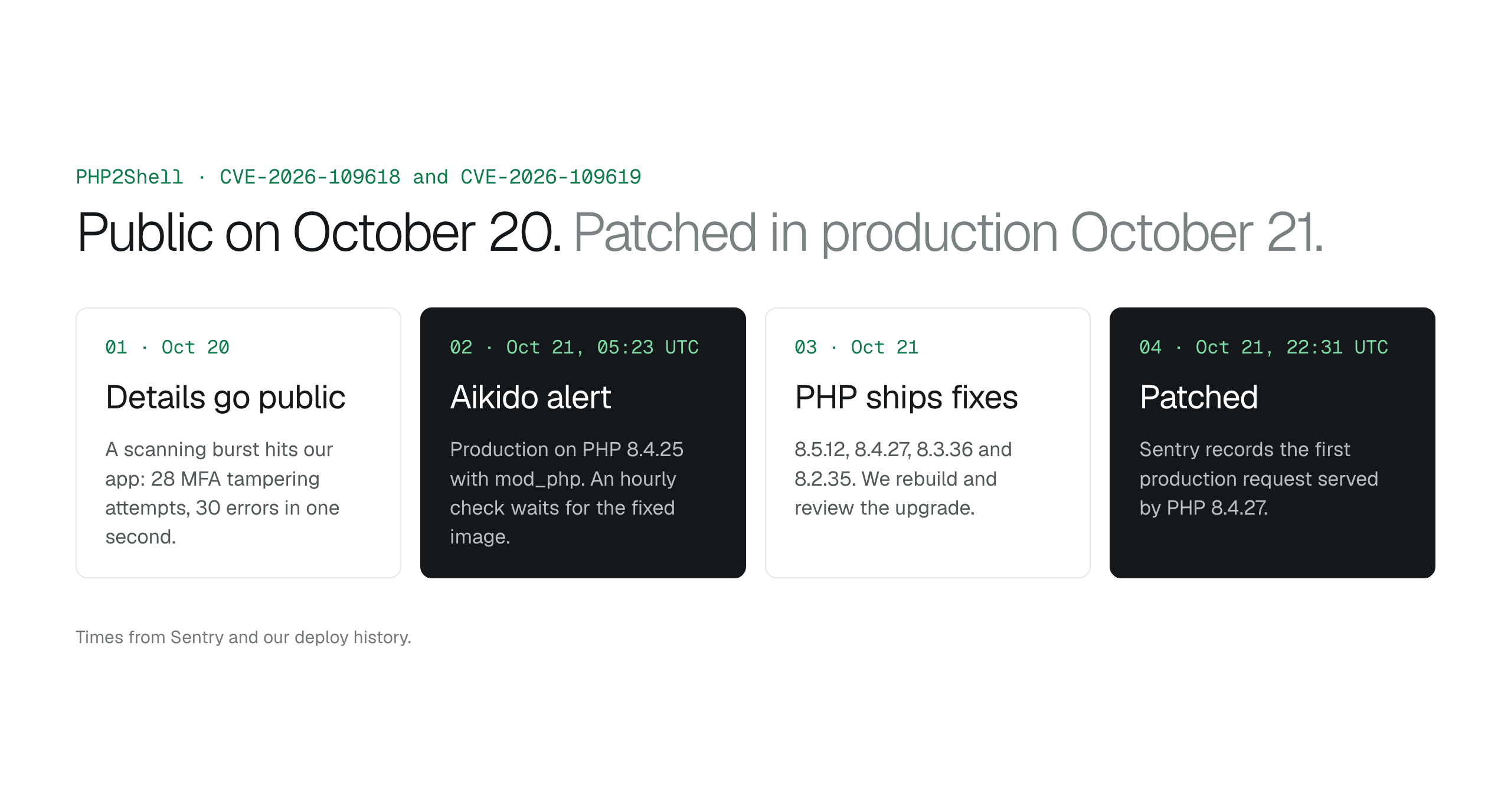
Sentry recorded a burst of hostile-looking traffic on October 20, the day details became public. At 16:33 UTC there were 28 attempts to tamper with a locked field on the admin sign-in's MFA step. At 17:11 UTC, 30 errors from oversized, deeply nested query strings arrived in one second, 3 of them uncaught fatal errors. The requests came from an AWS data-center range in Ashburn, Virginia, which looks like automated scanning. We found no sign of code execution. Attacker-triggered fatal errors are one of the conditions PHP flagged for CVE-2026-109619, so we treated the burst seriously.
We rebuilt our base image on PHP 8.4.27 the day the fixes shipped. Sentry recorded the first production request on 8.4.27 at 22:31 UTC on October 21. Our exposure window ran from the public details on October 20 to that moment.
- October 20: details become public and the scanning burst reaches our app
- October 21, 05:23 UTC: Aikido alert in hand, with an hourly check set for the fixed image
- October 21: PHP ships 8.4.27, and we build and review the upgrade
- October 21, 22:31 UTC: first production request served by PHP 8.4.27
How BucketDesk protects connected AWS accounts
BucketDesk reaches into customers' S3 buckets, so every connection is built in layers. Each layer limits what a single request, user or server can do in your account.
A connection is an IAM role in your account that trusts only BucketDesk's AWS identity and requires your external ID. BucketDesk stores the role ARN and external ID encrypted. Every request uses temporary STS credentials that expire within 15 to 60 minutes, and your files stay in your bucket.
Each connection starts read only and is confined to the bucket and prefix you approve. Uploads and deletes stay off until an admin turns them on. With the recycle bin on, deleted files stay restorable for 30 days.
Every AWS session carries the BucketDesk user acting, using STS SourceIdentity, so your CloudTrail shows who did what. You can check that activity yourself and remove the role at any time.
We checked that activity for the October 20 to 21 window, and every check came back clean. You can run the same CloudTrail check in your own account. STS records each AssumeRole in the region of the connection, so run it in the region of each connected bucket. BucketDesk's Minimum plan is free for one bucket.
aws cloudtrail lookup-events --region <bucket-region> \
  --lookup-attributes AttributeKey=EventName,AttributeValue=AssumeRole \
  --start-time 2026-10-20T00:00:00Z --end-time 2026-10-22T00:00:00Z
Connect customer AWS accounts without collecting access keysRecover deleted or overwritten files in Amazon S3
- CloudTrail: all 154 BucketDesk sessions came from our production server, on the same hourly and nightly rhythm as the days around them
- Audit log: no file was opened, uploaded or deleted from 03:33 UTC on October 20 until after the patch, which covers the whole scanning burst
- Buckets: object counts only grew during the window
Scope what each app can reach in S3
Give your team S3 access through a read-only role scoped to one bucket, so each app reaches only the files and actions you approve. BucketDesk is a web workspace for your own S3 buckets, connected through a role you can read, scope and remove yourself.
- Scope each connection
pick the bucket, prefix and actions a connection may use, such as read only
- Trace every session
each AWS session carries the BucketDesk user's identity into your CloudTrail
- Recover deletes
the recycle bin keeps deleted files restorable for 30 days
How BucketDesk uses IAM roles and External IDsSecurity at BucketDesk
The Minimum plan is free for one bucket.
Primary sources
- PHP 8 ChangeLog ↗
- BleepingComputer: PHP ships emergency patches for critical PHP2Shell flaws ↗
- Help Net Security: PHP2Shell vulnerabilities patched ↗
- Ubuntu: CVE-2026-109618 ↗
- Debian security tracker: CVE-2026-109618 ↗
- Red Hat: CVE-2026-109618 ↗
- AWS WAF: managed rules changelog ↗
- AWS STS: AssumeRole and SourceIdentity ↗
Discussion
0 comments · open to guests · moderatedLiked this? Get the next article by email. No schedule, no digest, one click to leave.